
Best Practices for Pair Programming in XP
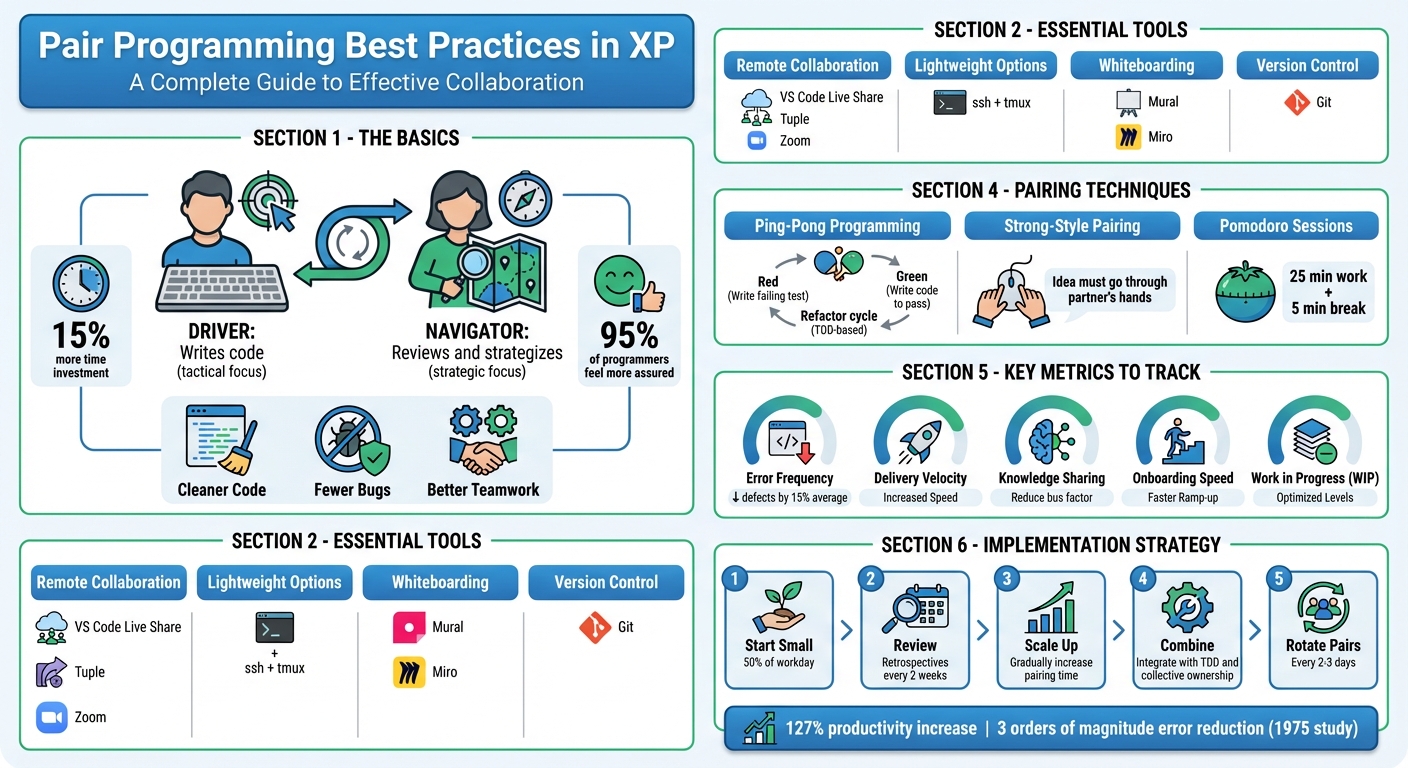
Pair programming, a core practice in Extreme Programming (XP), involves two developers working together at one workstation, alternating between two roles: Driver (writes code) and Navigator (reviews and strategizes). Though it may take 15% more time, it leads to cleaner code, fewer bugs, and better teamwork. This method also promotes knowledge sharing, reduces silos, and improves confidence, with 95% of programmers feeling more assured in their solutions.
To make pair programming effective:
- Use collaboration tools like VS Code Live Share, Tuple, or Zoom for seamless remote sessions.
- Set clear coding standards and break tasks into S.M.A.R.T. goals.
- Minimize distractions with focus techniques like the Pomodoro method (25-minute work intervals).
- Rotate roles every 15–20 minutes to balance tactical and strategic thinking.
- Try techniques like Ping-Pong programming (TDD-based collaboration) or Strong-Style pairing for deeper engagement.
Pair programming also supports XP principles like shared ownership and continuous testing. While it requires some adjustment, tracking metrics like error frequency, delivery velocity, and onboarding speed can help teams measure its impact. Start small, gradually increase pairing time, and integrate it with other XP practices for better results.
Pair Programming Best Practices: Roles, Techniques, and Key Metrics
The Pros & Cons Of Pair Programming (With Examples)
Setting Up Your Pair Programming Environment
In line with XP's emphasis on constant improvement, creating an efficient environment is key to effective collaboration. A solid setup begins with tools that make co-coding smoother. For remote teams with limited bandwidth, tools like ssh combined with tmux offer a lightweight, terminal-based solution.
"Screen sharing alone is not the only criteria to be met; both developers also need to be able to control the keyboard and mouse for productive pairing." - Sunit Parekh, Thoughtworks
Beyond just the code editor, virtual whiteboarding tools such as Mural or Miro are excellent for brainstorming and planning system architectures. For remote sessions, high-quality wireless headsets with directional microphones help avoid audio glitches. If you're working in person, dual workstations ensure that both programmers can participate equally.
Choose Your Collaboration Tools
The right tools eliminate unnecessary friction. For remote teams, VS Code Live Share with Audio and Chat plugins allows real-time collaboration while letting each programmer retain their preferred themes and shortcuts. Tools like Tuple or Zoom with dual control features are great for screen sharing and maintaining fluid interactions. Version control via Git is a must for frequent commits and tracking code changes. Always ensure that your chosen tools meet security standards to protect your codebase.
Set Coding Standards
Having consistent coding practices keeps pairing sessions smooth. Agree on a neutral editor that both participants are comfortable using, and invest time in learning its shortcuts. Regular team discussions, like show-and-tells, can help align everyone on architectural decisions and technical debt priorities. Before starting, break down stories into S.M.A.R.T. sub-tasks (Specific, Measurable, Achievable, Realistic, Time-related) and make them visible to avoid scope creep. A "Definition of Ready" checklist ensures stories are fully prepared, and rotating pairs regularly helps spread these standards across the team.
Once tools and standards are in place, maintaining focus is the next step.
Minimize Distractions
Staying focused is critical for productive pair programming. Research shows that recovering from an interruption can take over 23 minutes [9]. To reduce distractions, close unrelated apps like email or chat, and enable "Do Not Disturb" on all devices. Silence phones and turn off notifications.
"A pairing session should be interrupted by exactly zero Slack notifications or text messages. If one slips through, apologize and disable future ones." - Tuple [10]
Using the Pomodoro technique - 25 minutes of concentrated work followed by a 5-minute break - can help maintain energy and focus. Keep a notepad handy to jot down thoughts without disrupting the session. For remote teams with bandwidth challenges, consider using a mobile phone for audio while coding in VS Code Live Share to avoid lag-related interruptions.
Managing Roles and Team Dynamics
Clear roles are the backbone of productive pair programming. The driver focuses on tactical tasks - typing code, running tests, and handling immediate work - while the navigator takes a broader view, identifying potential issues, considering design choices, and anticipating roadblocks.
"The driver's thinking is supposed to be more tactical... The navigator can think more strategically in their observing role."
– Birgitta Böckeler, Technical Lead, Thoughtworks [3]
A key part of this dynamic is communication. Drivers should talk through their actions, while navigators provide guidance and feedback. A handy tip is the "5-Second Rule" - waiting a few seconds before pointing out small mistakes. This pause gives the driver a chance to self-correct, keeping the flow uninterrupted. Once roles are established, maintaining flexibility and balance becomes essential.
Assign Driver and Navigator Roles
The driver handles the immediate task at hand, while the navigator keeps track of the bigger picture by managing a "goal stack" of smaller tasks. Research indicates that while pair programming may take 15% more time, it results in higher-quality code [2]. This happens because the navigator essentially acts as a real-time code reviewer, catching issues as they emerge.
The physical or virtual setup plays a big role in fostering collaboration. For in-person settings, placing the monitor centrally ensures both participants feel equally involved. In remote setups, use tools that allow both partners to actively engage. When the navigator offers a suggestion, the driver should pause, acknowledge it, and ensure clear communication.
Rotate Roles Regularly
Frequent role switching helps prevent one person from dominating and ensures both participants get a mix of tactical and strategic thinking. Setting a timer for 15–20 minutes can provide natural intervals for switching roles.
"The two programmers switch roles frequently - every 15 minutes would be a good interval for us, though that's flexible."
– David G. Kay, Professor, UC Irvine [11]
For Test-Driven Development, consider Ping-Pong pairing: one person writes a failing test, the other writes the code to make it pass, and then they switch. Alternatively, you can rotate roles after completing milestones, like passing a unit test or finalizing a commit message. Before switching roles, always check with your partner to ensure a smooth handoff.
Beyond regular rotations, advanced techniques can further deepen collaboration.
Try Strong-Style Pairing
Strong-Style pairing operates on a simple but powerful principle: every idea must go through both partners [3]. In this approach, the navigator - often the more experienced team member - guides the driver on implementing the code. This method is particularly effective for sharing knowledge and onboarding new team members.
"For an idea to go from your head into the computer it MUST go through someone else's hands."
– Llewellyn Falco, Creator of Strong-Style Pairing [3]
This style requires active engagement from both parties. The driver listens and executes, while the navigator explains their thought process clearly. Strong-Style pairing is especially useful for transferring domain expertise and ensuring team members are on the same page.
sbb-itb-8feac72
Applying XP Pairing Techniques
Once roles are clearly defined, you can enhance pair programming with a few tried-and-true XP techniques. These methods align with the core principles of Extreme Programming (XP) - like continuous testing, shared ownership, and maintaining a sustainable pace - while ensuring both developers stay actively involved. These techniques naturally build on the foundations of the roles and setups discussed earlier.
Use Ping-Pong Programming
Ping-Pong programming blends Test-Driven Development (TDD) with pair programming by following a strict Red-Green-Refactor cycle [12][3]. Here's how it works: one developer writes a failing test ("ping"), and the other writes just enough code to make it pass ("pong"). Then, the roles switch, with either partner refactoring the code once all tests are green.
"The most effective form of pair programming I've experienced is called Ping Pong Pair Programming. I find it so effective that I prefer not to pair at all if I cannot ping pong program."
– Anthony Sciamanna, Technical Agile Coach, Industrial Logic [12]
To make role-switching seamless, use a dual-input workstation. For remote teams, tools that allow individual IDE preferences can help maintain flow. This approach keeps the focus on solving one failing test at a time and is a fantastic way to teach TDD to junior developers [12].
Pairing on every user story further strengthens teamwork.
Pair on Every Story
In XP, pair programming isn’t just about writing code - it’s about working together on every aspect of a production story, including planning, research, and documentation [14]. This approach ensures shared understanding and knowledge across the team.
"Two people working together can often make more progress on such a problem than if they worked separately. I certainly find I gain insight much faster with a second brain close at hand, and I'm far less likely to go down analytical rat-holes that can easily waste hours."
– Martin Fowler, Author and Speaker [1]
If both partners hit a roadblock on a tricky task, set a 30-minute timebox to research independently before regrouping to discuss findings. Breaking stories into S.M.A.R.T. tasks (Specific, Measurable, Achievable, Realistic, Time-related) and checking them off one by one helps maintain focus. While pairing might feel slower initially, it often results in higher-quality code with fewer bugs, saving time during later stages like testing and maintenance [13].
Work in Pomodoro Sessions
Pair programming can be mentally taxing, which is where the Pomodoro Technique comes in. This method structures work into 25-minute focused intervals, followed by 5-minute breaks, with a longer 15–30 minute break after every four sessions. A 2023 study found that students using this technique experienced less fatigue and better focus compared to those taking unstructured breaks.
"Pairing can be an exhausting practice, so it is helpful to get a reminder to take breaks and to switch the keyboard regularly."
– Birgitta Böckeler and Nina Siessegger, Thoughtworks
Before starting the timer, the pair should agree on a small, clear goal - like passing a specific unit test or completing a refactoring step. During breaks, step away from the screen to stretch, hydrate, or simply reset your mind. The timer also acts as a cue to switch roles between driver and navigator, ensuring both developers stay involved. For remote teams, Pomodoro sessions are a great way to combat Zoom fatigue by enforcing regular, structured breaks.
Tracking Results and Maintaining Momentum
Once you've established pair programming techniques, the next step is to ensure you're keeping track of progress and maintaining steady improvement. To do this, focus on monitoring key metrics that reflect the effectiveness of pair programming. Start with error frequency - pair programming acts as "real-time code review", catching mistakes before they make it into the codebase [3][5]. Another important metric is delivery velocity, which helps measure predictability. While pairing may initially add about 15% overhead compared to solo work, this is usually balanced out by better code quality and less time spent in QA or fixing issues [15][7].
You should also evaluate knowledge sharing within the team. A skill matrix can help track how many team members are familiar with specific parts of the codebase, reducing the "bus factor" - the risk of relying on a single person for critical knowledge [3][7]. For new team members, measure onboarding speed, as pair programming can significantly shorten the time it takes for junior developers to become productive [3][16]. Since productivity isn't always easy to quantify, use team retrospectives to discuss whether pairing is making the team feel more effective [4].
Monitor Key Metrics
In addition to error frequency and delivery velocity, pay attention to Work in Progress (WIP) levels. Pair programming naturally limits WIP because you're working in pairs, effectively halving the number of independent tasks being tackled at once [15]. It's also a good idea to assess design quality and test coverage, as pairing often leads to cleaner designs and more thorough testing [4][7]. Digitally mark completed tasks to keep the team motivated and ensure steady progress [3][5]. These metrics provide a clear picture of how pairing impacts your workflow and help guide its gradual adoption.
Start Small and Scale Up
Introducing pair programming requires a thoughtful, gradual approach to avoid overwhelming the team. Jumping into full-time pairing from day one can lead to burnout [3][7]. A better strategy is to start with pairing for about 50% of the workday, focusing on core coding hours while leaving time for other tasks like emails, research, and meetings [3]. Use retrospectives every two weeks to review how pairing is working and adjust the balance as the team gains confidence and sees the benefits.
Combine with Other XP Practices
Pair programming works best when combined with other Extreme Programming (XP) practices like Test-Driven Development (TDD) and collective code ownership. For example, pairing TDD with Ping-Pong programming creates a back-and-forth rhythm that keeps both developers actively engaged. Rotating pairs every 2–3 days also supports collective code ownership by preventing "information silos", where only a few people understand specific parts of the codebase [3][5]. This cohesive approach not only boosts productivity but also helps the team maintain a sustainable pace over time.
Conclusion
Pair programming in Extreme Programming brings a disciplined approach to team development, blending real-time collaboration with immediate code reviews and shared knowledge. By sticking to the best practices outlined in this checklist, teams can catch defects as they happen, balance tactical coding with strategic thinking, and break down information silos across the codebase [3][6][8]. The outcome? Code that's not only cleaner and easier to maintain but also understood collectively, rather than locked away in the minds of a few experts.
The advantages go far beyond just better code. Studies reveal that pair programming can cut software defects by an average of 15%. Even as far back as 1975, research showed that two-person programming teams achieved a 127% increase in productivity while reducing error rates by three orders of magnitude [8]. These practices aren't just about fixing bugs - they're about driving efficiency and improving overall team output [1][10].
"I believe that the best programs and designs are done by pairs, because you can criticise each other, and find each other's errors, and use the best ideas." - Jean Bartik, ENIAC Programmer [3]
To fully leverage these benefits, integration is key. Pair programming works best when paired with other XP practices like Test-Driven Development through Ping-Pong programming, regular pair rotation to foster collective ownership of the code, and Pomodoro sessions to maintain a steady work rhythm [3][7]. Start small, experiment, and let your team gain confidence as they experience real improvements in both delivery speed and code quality.
FAQs
How does pair programming enhance code quality and teamwork?
Pair programming improves code quality by bringing two minds together to tackle the same task in real time. One developer writes the code while the other reviews it on the spot, acting as a second set of eyes. This setup helps catch errors early, ensures coding standards are followed, and leads to cleaner, more dependable code. Plus, the constant back-and-forth of ideas often results in more effective problem-solving.
When it comes to teamwork, pair programming fosters stronger communication and builds trust between team members. It promotes shared responsibility for the code, which helps create a more united and collaborative team environment. For junior developers, it’s an excellent opportunity to learn directly from their more experienced colleagues, encouraging skill growth and knowledge-sharing. While it can take some time to get used to, the payoff is a team that works better together and produces higher-quality software.
What are the best tools for remote pair programming?
To get the most out of remote pair programming, it’s crucial to have tools that enable smooth collaboration and communication. The essentials? Screen sharing software, collaborative code editors, and video conferencing platforms. These tools work together to create a seamless workflow for developers.
For instance, a collaborative code editor lets both participants write and review code at the same time, making real-time problem-solving a breeze. Meanwhile, screen sharing and video calls help clarify ideas and provide context, ensuring that everyone stays on the same page. Focus on tools that are reliable, easy to use, and fit well with your team’s workflow to keep productivity high.
What are the benefits of switching roles in pair programming?
Switching roles in pair programming - alternating between the driver and navigator - keeps both participants actively involved while preventing burnout. This approach balances the workload and keeps the process lively and productive.
Rotating roles also encourages shared learning and expertise, giving both developers hands-on experience with various aspects of the task. This builds team adaptability, strengthens collective responsibility for the code, and sparks collaboration by allowing each person to tackle challenges from fresh angles.
Regular role rotation can boost communication, provide a deeper grasp of the codebase, and create a workflow that feels more inclusive and efficient for everyone involved.