

Top 5 Tools for Managing Virtual Teams in 2025
Managing virtual teams has become essential as remote work dominates the global workforce, with 75% of employees working remotely by 2025. The right tools can address issues like fragmented communication, time zone challenges, and notification overload while boosting productivity by up to 47%. This article highlights five standout platforms for virtual collaboration:
- Slack: A messaging hub with 2,600+ integrations, AI-powered thread summaries, and Workflow Builder for automating repetitive tasks.
- Microsoft Teams: Ideal for Microsoft 365 users, offering AI tools like Copilot, real-time document collaboration, and advanced security.
- Zoom: Known for high-quality video meetings, Zoom now includes AI-powered features like meeting summaries and collaborative tools like Whiteboards.
- Asana: A project management tool with multiple views (Kanban, Timeline), automation, and integrations to streamline complex workflows.
- Google Workspace: Combines Gmail, Google Meet, and Docs for seamless collaboration, with AI tools like Gemini for workload management.
Each platform caters to specific team needs, from communication to project management. Below is a quick comparison to help you choose the best fit.
Quick Comparison
| Tool | Key Features | Best For | Starting Price (Annual) |
|---|---|---|---|
| Slack | Messaging, AI summaries, automation | Real-time chat, app integrations | $7.25/user/month |
| Microsoft Teams | Chat, video, Microsoft 365 tools | Office 365 users | $4.00/user/month |
| Zoom | Video meetings, AI tools, Whiteboards | Video-focused teams | $13.32/user/month |
| Asana | Project tracking, automation | Task-heavy workflows | $10.99/user/month |
| Google Workspace | Email, video, real-time editing | Document collaboration | $6.00/user/month |
Choosing the right tool depends on your team's priorities, such as communication, task management, or document collaboration.
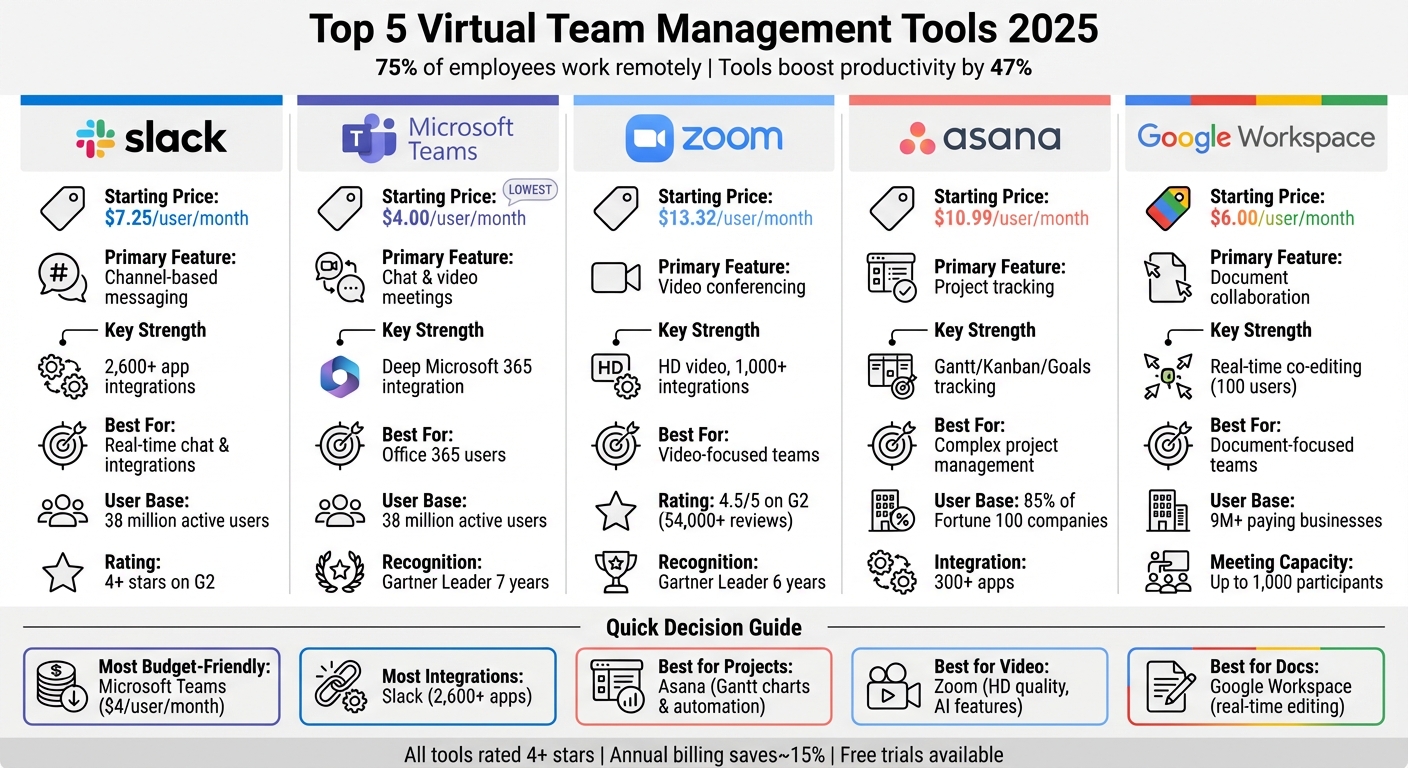
Virtual Team Management Tools Comparison 2025: Features and Pricing
5 Remote Management Tech Tools I Can't Live Without
1. Slack
Slack has grown far beyond its origins as a simple chat tool. Today, it’s a central hub for 38 million active users [1], enabling teams to streamline conversations, automate tasks, and access their entire software stack - all without the hassle of constantly switching between apps [3].
Communication Features
Slack keeps team discussions organized with channels and threads, making it easy to structure conversations by project, department, or topic. This setup helps reduce the chaos of overflowing inboxes [1]. Need a quick face-to-face? Slack Huddles offer instant audio and video calls with screen-sharing, making remote interactions feel more personal [5]. For teams scattered across time zones, asynchronous tools like status updates and a searchable message history ensure everyone stays in sync, even without real-time responses [1].
To tackle information overload, Slack AI steps in. It condenses long threads and channels into quick, digestible summaries, so catching up on missed conversations takes minutes instead of hours [6]. Slack also includes Canvas for creating project briefs and Lists for task tracking - both integrated directly into the platform [3]. For external projects, Slack Connect provides secure spaces to collaborate with clients, vendors, or partners without compromising sensitive data [1].
Integration Capabilities
With over 2,600 app integrations, Slack becomes the nerve center for your tech tools [1]. You can launch Zoom meetings, manage Trello boards, or get updates from Notion and Miro - all without leaving the app [8]. Its Workflow Builder takes it a step further, automating repetitive tasks like onboarding new hires or sending approval requests. This feature saves teams an average of 28% on routine tasks [5].
A great example? Siemens Smart Infrastructure connected 14,000 employees across 20+ countries by integrating Wrike with Slack. They created 250 custom workflows, boosting global productivity by 10% [8].
Slack’s ability to integrate and automate makes it a standout tool for remote collaboration, setting a high bar for other virtual team platforms.
Pricing (USD)
| Plan | Monthly Cost | Key Features |
|---|---|---|
| Free | $0 | Basic features for small teams [4] |
| Pro | $8.75/user | Unlimited message history, Huddles, Slack Connect [8] |
| Business+ | $15.00/user | Advanced security, 24/7 support [8] |
| Slack AI Add-on | +$10.00/user | Thread summarization, enterprise search [4] |
For most teams, the Pro plan offers a solid mix of features like unlimited message history and app integrations. Larger organizations with stricter security needs might find Business+ or Enterprise Grid a better fit [8].
2. Microsoft Teams
Microsoft Teams is the go-to collaboration hub for Microsoft 365 users. With over 38 million active users [1], it has been recognized as a Leader in the 2025 Gartner® Magic Quadrant™ for Unified Communications as a Service for the seventh year in a row [9]. The platform brings together chat, video meetings, and file sharing in one centralized workspace.
Communication Features
Teams enhances communication with AI-powered tools. Features like AI Rewrite help refine text, while Copilot simplifies chats and summarizes meeting content. To make virtual meetings feel more personal and reduce fatigue, Together Mode creates a shared virtual environment [12].
Meetings on Teams can last up to 30 hours and accommodate varying capacities to suit business or webinar needs [11][12]. Loop components allow users to share dynamic lists, tables, and action items that stay updated across chats and channels in real time. For global teams, inline translation supports 35 languages, breaking down language barriers [10].
Integration Capabilities
Microsoft Teams stands out for its seamless integration with the Microsoft 365 suite. Users can co-author documents or edit spreadsheets and presentations directly during meetings with Excel Live and PowerPoint Live.
The platform also supports over 2,500 third-party apps [12]. With Teams Connect, shared channels make it easy to collaborate with external partners and clients without requiring them to switch tenants or create new accounts. A study revealed that organizations adopting Teams Phone experienced a 143% return on investment [11], showcasing its value beyond just improving productivity.
"With our Teams-based video banking service, every customer immediately gets an advisor." - Vincent Bakker, Daily Banking Advisor, ABN AMRO [14]
Microsoft Teams’ deep integration with other tools and its advanced meeting features set a high standard as we look at other virtual collaboration platforms.
Pricing (USD)
| Plan | Monthly Cost | Key Features |
|---|---|---|
| Teams Essentials | $4.00/user | 300 participants, 30-hour meetings, 10 GB storage [13] |
| Business Basic | $6.00/user | 1 TB storage, web/mobile apps, business email [13] |
| Business Standard | $12.50/user | Desktop apps, webinars, Microsoft Loop [13] |
| Business Premium | $22.00/user | Advanced security and device management [12] |
| Copilot Add-on | +$21.00/user | AI meeting summaries, content creation [13] |
| Teams Premium Add-on | +$10.00/user | Advanced meeting protection, AI-generated notes [13] |
For most teams, the Business Standard plan at $12.50/user offers the best balance of features, including desktop apps and webinar hosting [13]. Microsoft also provides a one-month free trial for its Business Basic and Business Standard plans. All paid subscriptions come with a 99.9% financially backed uptime guarantee [13].
3. Zoom
Zoom has transformed into Zoom Workplace, an AI-driven collaboration platform that combines video meetings, team chat, cloud VoIP (Zoom Phone), and integrated mail and calendar services. With a 4.5/5 rating on G2 from over 54,000 reviews [15] and being named a Leader in the 2025 Gartner® Magic Quadrant™ for UCaaS for the sixth year in a row [15], Zoom continues to stand out in virtual communication.
Communication Features
Zoom Workplace offers HD video meetings for up to 100 participants on its free and Pro plans, with room for 300 participants on the Business plan [16]. The platform also provides translated captions in 33 languages [18], making it accessible for global teams. For asynchronous communication, Zoom Clips enables users to share short video messages and screen recordings, reducing the need for constant meetings by moving updates to on-demand videos [18].
The Zoom AI Companion simplifies post-meeting tasks and content creation. Its "in-meeting query" feature lets users ask questions about missed parts of a meeting without disrupting the flow [18]. Meanwhile, Zoom Phone ensures reliable business calls with a 99.999% uptime SLA [17].
"It always comes down to 'I want to work on my business, not in my business.' Zoom AI Companion allows me to have that time back to do the work that only I can do." - Nancy Koziol, Founder, couch + cork [15]
Beyond communication, Zoom’s integration capabilities further enhance its usability.
Integration Capabilities
Zoom’s open ecosystem supports over 2,600 integrations [1], making it easy to connect with tools like Microsoft 365 and Google Workspace. For example, users can launch Zoom meetings directly from Slack or share Zoom Whiteboards within Slack [1]. Through Zapier, teams can automate workflows by linking Zoom with project management tools like Asana, Monday.com, Jira Cloud, and Wrike [4]. Cricut, for instance, reduced call abandonment by 90% by integrating its workflows into Zoom [15].
Project Management Tools
Zoom Workplace also incorporates tools to simplify project management. Zoom Docs provides AI-powered collaborative documents, while Zoom Whiteboard supports visual brainstorming with features like sticky notes and co-annotation during meetings [4]. The built-in Tasks tool tracks action items from meetings, and Zoom Scheduler allows external participants to book meetings based on team availability [17]. Additionally, continuous meeting chats automatically organize files and decisions, keeping everything connected before, during, and after meetings [17]. These features reduce the need for additional tools, aligning with the productivity-boosting trends seen in other platforms.
"Zoom Workplace turns my brainwaves into polished gems. From meetings, I can create Clips, Notes, Docs, or even whiteboards faster than you can say, 'transcript.'" - Marquesa Pettway, Founder [15]
Pricing (USD)
| Plan | Monthly Cost | Key Features |
|---|---|---|
| Workplace Basic | Free | 40-min meetings, 100 participants, 3 whiteboards, basic Docs [16] |
| Workplace Pro | $13.33–$15.99/user | 30-hour meetings, AI Companion, 10 GB cloud storage, unlimited Docs [16][19] |
| Workplace Business | $17.08–$20.49/user | 300 participants, unlimited whiteboards, Zoom Scheduler, SSO [16][19] |
| Workplace Business Plus | $22.49/user | Includes Zoom Phone and advanced workspace features [20] |
| AI Companion 2.0 Add-on | +$12.00/user | Customizable AI assistant (Available first half of 2025) [4] |
For growing virtual teams, the Workplace Business plan at $18.33/user per month (billed annually) is a solid choice, offering enhanced participant capacity and unlimited whiteboards. Opting for annual billing typically saves users around 15% compared to monthly payments [16].
sbb-itb-8feac72
4. Asana
Asana is a widely used work management platform, trusted by 85% of Fortune 100 companies as of December 2023 [21][22]. It tackles the issue of "work about work", which eats up 60% of an employee's time [23]. For virtual teams, Asana serves as a centralized hub for tracking projects and reducing scattered communication, making remote collaboration much smoother.
Project Management Tools
Asana offers multiple views - List, Calendar, Timeline, and Kanban - so teams can choose the format that works best for them. Tasks can be broken down into subtasks, each with assigned owners, deadlines, and dependencies, ensuring clear accountability. Automation tools like Rules, Forms, and AI-powered thread summaries simplify workflows, while resource management features like Workload and Capacity Planning help managers keep an eye on team bandwidth and adjust assignments as needed. Plus, pre-built templates for recurring workflows make starting new projects faster and easier.
"Asana is our air traffic control. We have the visibility to scale production and support a higher number of ad campaigns to support our revenue goals." – Eugenia Contreras, Associate Manager, Spotify [21]
Communication Features
Asana keeps collaboration organized with task comments, @mentions, and a centralized Inbox. It acts as a system of record, consolidating conversations and updates in one place. The mobile apps make it convenient to approve tasks or check statuses, no matter the time zone.
Integration Capabilities
With over 300 integrations, Asana connects seamlessly with tools like Slack, Microsoft Teams, Zoom, Google Workspace, Jira, Salesforce, and PowerBI. For example, its Slack integration allows users to turn chats into trackable tasks and receive automatic updates on task progress. The Google Workspace integration lets teams attach Drive files to tasks while keeping version control intact. These integrations cut down on tool-switching, helping teams work more efficiently [24].
"Asana makes everything shareable, which saves us time executing programs because it's so much easier to replicate and learn from what others have done." – Simon Levinson, Global Digital Manufacturing Process Innovation Manager, Danone [21]
Asana's blend of streamlined project management and extensive integrations makes it an essential tool for virtual teams, complementing other collaboration tools.
Pricing (USD)
| Plan | Annual Billing | Monthly Billing | Best For |
|---|---|---|---|
| Personal | Free | Free | Individuals or small teams starting out |
| Starter | $10.99/user/month | $13.49/user/month | Growing teams needing Timeline views and workflow automation |
| Advanced | $24.99/user/month | $30.49/user/month | Larger teams requiring portfolio management and workload balancing |
| Enterprise | Contact Sales | Contact Sales | Organizations needing advanced security and 24/7 support |
| Enterprise+ | Contact Sales | Contact Sales | Companies with strict compliance requirements (HIPAA) |
For most virtual teams, the Starter plan at $10.99 per user per month (billed annually) offers the core features needed to move beyond simple task lists into visual project scheduling. Additionally, paid plans include an "Unlimited Free Guests" feature, allowing collaboration with freelancers or clients without adding extra costs for seats.
5. Google Workspace
For leaders managing virtual teams, Google Workspace offers a streamlined platform for communication, collaboration, and project management. It brings together email, video conferencing, cloud storage, and document sharing into a single system. This reduces the need to switch between apps and helps teams stay productive. By October 2021, it was already supporting 9 million paying businesses and over 170 million education users [27]. Its cloud-based design ensures teams can collaborate effectively, no matter where they are. Let’s dive into how its communication tools enhance virtual teamwork.
Communication Features
Google Meet supports video calls with up to 1,000 participants and can livestream events to as many as 100,000 viewers [25]. Features like noise cancellation, real-time captions with translations, and automatic meeting recordings make it a robust tool for virtual communication. Teams can also use Google Chat, which organizes discussions into "Spaces." These Spaces allow file sharing, task assignments, and even quick voice "huddles" without the need for scheduled meetings [25].
For real-time collaboration, Google Workspace allows up to 100 users to co-edit documents simultaneously, with automatic saving and version tracking [25][26]. Meanwhile, Google Calendar simplifies scheduling by displaying coworkers' availability across time zones and automatically adding Meet links to invites [26][5].
The Gemini AI assistant helps teams manage their workload by summarizing email threads, drafting documents, and creating meeting notes [25]. Additionally, teams can build internal project hubs using Google Sites, centralizing key resources like timelines, deliverables, and documents [28].
Integration Capabilities
Google Workspace connects seamlessly with thousands of third-party apps through its Marketplace, including tools like Atlassian, Salesforce, and Intuit [27]. It also integrates with Slack, enabling users to join Meet calls, share Drive files, and receive Calendar updates directly within Slack channels [7]. After retiring Jamboard in late 2024, Google introduced integrations with whiteboarding tools like Miro, Lucidspark, and Figjam by Figma [27].
For those using Microsoft Outlook, the "Google Apps Sync" plugin ensures email, calendar, and contact synchronization with Workspace [27]. Another standout feature is AppSheet, a no-code platform included in Workspace, which lets teams create custom apps and automations to connect Workspace data with other business tools [29][26].
Pricing (USD)
Google Workspace offers flexible pricing plans to accommodate teams of all sizes:
| Plan | Annual Billing | Monthly Billing | Storage | Meeting Capacity | Best For |
|---|---|---|---|---|---|
| Business Starter | $7.00/user/month | $8.40/user/month | 30 GB/user | 100 participants | Small teams needing basic email and storage |
| Business Standard | $14.00/user/month | $16.80/user/month | 2 TB/user | 150 participants + recording | Teams that need more storage and recording options |
| Business Plus | $22.00/user/month | $26.40/user/month | 5 TB/user | 500 participants | Teams requiring advanced security features |
| Enterprise Standard | $27.00/user/month | $32.40/user/month | 5 TB+/user | 1,000 participants | Large organizations (300+ users) needing DLP |
| Enterprise Plus | $35.00/user/month | $42.00/user/month | 5 TB+/user | 1,000 participants | Organizations needing S/MIME encryption and compliance |
Business plans support up to 300 users, while Enterprise plans have no user limits [30][31]. Opting for annual billing can save teams around 16% compared to monthly billing [30]. All plans come with a 14-day free trial and a 99.9% uptime guarantee for Enterprise editions [29][31].
Tool Comparison Table
Here's a quick reference table summarizing the main features of each tool discussed earlier:
| Tool | Primary Communication Feature | Integration Capability | Project Management Focus | Starting Price (Annual) | Best For |
|---|---|---|---|---|---|
| Slack | Channel-based messaging & Huddles | 2,600+ apps | Lightweight (Lists/Workflows) | $7.25/user/month | Teams prioritizing real-time chat and extensive third-party integrations |
| Microsoft Teams | Chat & Video Meetings | Deep Microsoft 365 integration | Integrated with Planner/Tasks | $4.00/user/month | Organizations using Office 365 needing secure, enterprise-grade collaboration |
| Zoom | Video Conferencing | 1,000+ (Zoom Apps) | Visual collaboration (Whiteboards) | $13.32/user/month | Teams needing reliable, high-quality video meetings and webinars |
| Asana | Task comments & Status updates | 260+ apps | Robust (Gantt/Kanban/Goals) | $10.99/user/month | Cross-functional teams managing complex projects with detailed task tracking |
| Google Workspace | Meet & Google Chat | Deep Google ecosystem | Seamless document and task management | $6.00/user/month | Document-focused teams requiring real-time co-editing and a unified virtual office |
Microsoft Teams stands out as the most budget-friendly option at $4.00/user/month, making it perfect for Office 365 users. Slack shines with its extensive 2,600+ app integrations, streamlining workflows across multiple platforms. For project management, Asana leads the pack with its Gantt charts, goal tracking, and workflow automation. Zoom remains a go-to for teams prioritizing high-quality video conferencing and webinars. Meanwhile, Google Workspace is an excellent choice for teams focused on seamless document collaboration within the Google ecosystem.
All these tools boast 4+ star ratings on G2 and offer competitive pricing ranging from $4.00 to $13.32 per user/month. For larger organizations, it's worth exploring advanced security and administrative features available in premium tiers.
This table provides a clear snapshot to help leaders match the right tool to their team's specific needs.
Conclusion
Managing virtual teams in 2025 requires having the right digital tools to close communication gaps, streamline workflows, and stay on top of team activities. These five platforms have evolved from being optional extras to becoming essential parts of modern business operations.
Not only do these tools tackle the common challenges of remote work, but they also improve efficiency in measurable ways. As Jaime Watkins from Playroll aptly puts it:
Remote management tools are no longer optional. Because remote and hybrid work have become the standard, not the exception [2].
With only 27% of U.S. companies planning a full return to office life by the end of 2026 [2], building the right collaboration toolkit isn't just a good idea - it’s crucial for staying competitive.
Each platform offers unique strengths for virtual collaboration. For example, if you're already using Office 365, Microsoft Teams integrates seamlessly. Need robust third-party integrations? Slack connects with over 2,600 apps. For managing complex projects, Asana is a standout. Zoom continues to be a go-to for video meetings, while Google Workspace is ideal for teams focused on browser-based document collaboration. The key is to choose tools that align with your team's specific needs and existing workflows.
FAQs
What should I look for in a tool to effectively manage virtual teams?
When picking a tool to manage virtual teams, it’s important to focus on features that help everyone work together smoothly. Look for options that offer real-time communication, video conferencing, file sharing, and project management. These features make it easier for team members to stay connected and on the same page, no matter where they are.
Security should also be a top priority. Go for platforms with strong data protection to keep sensitive information safe. At the same time, choose tools that are easy to use - this reduces the learning curve and encourages everyone to adopt them quickly.
Lastly, think about how well the tool fits into your current setup. Tools that integrate easily with your existing software and can scale as your team grows are worth considering. By focusing on these aspects, you can find a solution that boosts collaboration and supports your virtual team effectively.
How do AI features make virtual team management tools more effective?
AI is transforming virtual team management tools by taking over repetitive tasks, offering actionable insights, and making communication smoother. For example, it can automatically create meeting summaries, recommend action items, and help with scheduling, cutting down on time and effort.
These tools also use AI to analyze data and deliver predictive insights, helping managers allocate resources wisely and spot potential issues before they arise. By simplifying workflows, boosting collaboration, and enabling smarter decisions, AI helps virtual teams stay productive and connected, no matter where they’re located.
What are the costs of using tools for managing virtual teams?
The cost of tools for managing virtual teams in 2025 depends on the platform you choose and the features you require. Many platforms provide free basic plans, but these often come with limited capabilities. If you need more advanced options - like integrations, enhanced security, or meeting automation - you’ll likely need a paid subscription. These premium plans typically range from $8 to $20 or more per user each month.
Platforms like Zoom, Microsoft Teams, Slack, and Google Workspace offer tiered pricing models based on user count and service levels. For instance, Microsoft Teams and Slack are sometimes bundled with other productivity tools or enterprise packages, which can make the overall cost higher. If your team relies on robust tools for smooth remote collaboration, it might be worth budgeting for higher-tier plans.
The final expense will largely hinge on factors like your team size, the features you prioritize, and the platform you settle on. Take the time to assess your specific needs to find the most suitable option for your team.