
How to Perform a Cloud Security Risk Assessment
A cloud security risk assessment helps identify potential threats, vulnerabilities, and risks in your cloud systems to prevent breaches, financial loss, and compliance violations. With the average cost of a data breach in 2024 reaching $4.88 million (and higher for public cloud data), organizations must secure their cloud environments effectively. Misconfigurations, weak access controls, and insider threats are common issues, and understanding the shared responsibility model - where the cloud provider secures infrastructure while you secure your data - is critical.
Key Steps:
- Identify and Classify Cloud Assets: Build an inventory of cloud resources and classify data by sensitivity (e.g., public, internal, sensitive, highly sensitive).
- Spot Threats and Vulnerabilities: Detect external threats (e.g., malware, phishing) and internal risks (e.g., misconfigurations, shadow IT).
- Assess and Prioritize Risks: Use a risk matrix to evaluate threats based on likelihood and impact, focusing on high-priority risks.
- Implement Controls: Apply technical measures like encryption, IAM policies, and CSPM tools, along with employee training to mitigate risks.
- Monitor Continuously: Maintain a risk register, automate monitoring, and conduct regular reviews to stay ahead of evolving threats.
By following these steps, you can protect your cloud infrastructure, meet compliance requirements, and reduce the likelihood of costly incidents. Leadership plays a key role in supporting these efforts and aligning security with business goals.
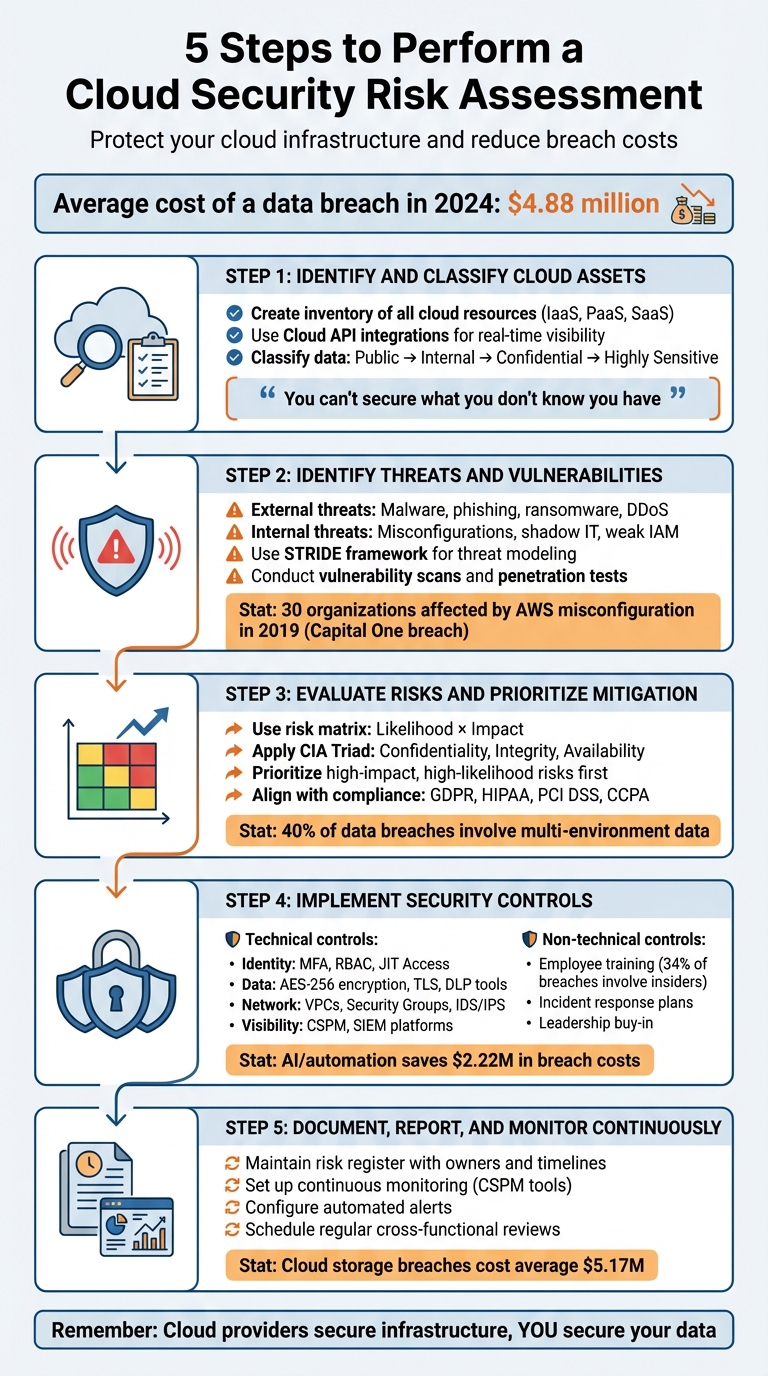
5 Steps to Perform a Cloud Security Risk Assessment
Strategies for Cloud Security Risk Management | Google Cloud Cybersecurity Certificate
Step 1: Identify and Classify Cloud Assets
Before you can secure your cloud environment, you need to know exactly what you're dealing with. As Michael Hendricks from Rippling wisely states:
"You can't secure what you don't know you have." [4]
This first step is all about creating a detailed inventory of your cloud resources and organizing them based on their level of sensitivity. This groundwork is crucial for spotting potential threats and setting up the right security measures later on.
Create an Inventory of Cloud Assets
Start by cataloging all your cloud resources, whether they fall under IaaS, PaaS, or SaaS. This includes virtual machines, containers, storage buckets, databases, network configurations (like firewalls and subnets), user identities, and APIs. Don’t forget to account for any unauthorized "Shadow IT" lurking in your environment.
The quickest and most reliable way to track cloud assets is through Cloud API integrations. These tools provide real-time visibility into your constantly changing environment. For instance, Google Cloud Asset Inventory can export metadata to platforms like BigQuery for ongoing analysis. When building your inventory, go beyond just listing resources - include metadata like ownership details, lifecycle dates, and cost centers. Also, establish clear naming conventions and tagging systems to make audits and compliance checks smoother.
Classify Data by Sensitivity Level
Once your inventory is complete, the next step is to classify your assets based on the potential damage that could occur if they were compromised. Many organizations use a four-tier classification system:
- Public: Data meant for public access, such as marketing materials or press releases.
- Internal: Information intended for internal use, like organizational charts or internal memos.
- Confidential/Sensitive: Data that needs protection, such as personally identifiable information (PII) or financial reports.
- Highly Sensitive: Critical data, including health records subject to HIPAA, credit card data governed by PCI DSS, or proprietary trade secrets.
When classifying assets, align your approach with regulations like GDPR, HIPAA, PCI DSS, or CCPA. Be cautious about over-classifying data as "Highly Sensitive", as this can lead to unnecessary costs and operational delays. To stay on top of things, leverage automated Data Security Posture Management (DSPM) tools to scan your cloud environment for "shadow data" or orphaned assets. Finally, document the security measures required for each sensitivity tier to ensure consistency and compliance.
Step 2: Identify Threats and Vulnerabilities
Once you've mapped out your cloud assets, the next step is to uncover potential risks. This means spotting both the external attackers trying to breach your defenses and the internal weaknesses that could leave you exposed. By distinguishing between external and internal threats, you can get a clearer picture of your risk landscape.
External and Internal Threats
External threats are those that come from outside your organization. These include malware, phishing attempts, ransomware, and targeted cyberattacks aimed at stealing, exposing, or destroying your data [3][8]. Attackers often exploit entry points using DDoS attacks or social engineering tactics to trick employees into revealing sensitive information like login credentials.
Internal threats, on the other hand, are often trickier to detect because they originate within your own organization. A common culprit? Misconfigurations. These can include public storage buckets, open APIs, or overly permissive firewall rules [8][9]. A notable case in 2019 involved a hacker exploiting a misconfiguration in AWS platforms, affecting 30 organizations, including Capital One. This breach exposed sensitive customer data like Social Security numbers and bank details, highlighting how even secure infrastructure can be compromised without proper configuration [9].
Internal risks don’t stop there. Missteps like shadow IT - where employees or contractors set up unauthorized cloud resources - can create blind spots for IT teams. Insider threats, whether due to malicious intent or simple negligence, are another concern. Weak Identity and Access Management (IAM) policies that grant excessive permissions can also leave your systems vulnerable [8][9][6]. To systematically assess these threats, consider using threat modeling frameworks like STRIDE (Spoofing, Tampering, Repudiation, Information Disclosure, Denial of Service, Elevation of Privilege). These frameworks help you map out potential attack paths based on your architecture and data flows [8].
Conduct Vulnerability Assessments
Once you've identified potential threats, it's time to evaluate your vulnerabilities. This involves a mix of automated and manual methods. Automated vulnerability scans and manual penetration tests can help identify issues like unpatched software, exposed services, and misconfigurations by comparing your systems against databases of known flaws [8][10].
Leverage cloud-native tools such as AWS Config, Azure Policy, or Google Cloud Security Command Center to monitor configurations in real time [8]. Penetration testing, which simulates real-world attacks, can reveal whether your vulnerabilities are exploitable [8]. Pair this with Cloud Security Posture Management (CSPM) tools to continuously audit your cloud settings. CSPM tools can flag issues like public storage buckets or improperly configured encryption before they lead to breaches [8][9].
Regularly review IAM permissions and enforce the Principle of Least Privilege, ensuring users and services only have the access they truly need [8][6]. Finally, stick to a consistent patch management schedule to address known vulnerabilities in your operating systems and applications [9]. The insights gained from these assessments will be critical for prioritizing risks in the next step.
Step 3: Evaluate Risks and Prioritize Mitigation
Now that you've identified your assets and potential threats, the next step is to measure the risks and decide which ones need immediate action. Not all risks carry the same weight - some could lead to massive financial losses, while others might only cause minor disruptions. The focus here is to assess each risk based on two key factors: how likely it is to occur and the extent of the damage it could cause.
Use a Risk Matrix for Evaluation
A risk matrix is a practical tool to help you rank risks by plotting them based on their likelihood and potential impact [3][11]. To evaluate likelihood, consider factors like discoverability, exploitability, and reproducibility [3]. For instance, a publicly exposed S3 bucket containing sensitive data is highly likely to be exploited since attackers actively search for such vulnerabilities. On the other hand, a zero-day vulnerability without a known public exploit would rank lower in likelihood.
When assessing impact, think about costs related to monetary losses, recovery efforts, regulatory penalties, and damage to your reputation. The CIA Triad - Confidentiality, Integrity, and Availability - is a helpful framework here. For example, a breach exposing customer personally identifiable information (PII) would have a critical impact on confidentiality, while a service outage affecting your primary application would significantly harm availability.
Once risks are measured, prioritize mitigation by weighing the cost of security measures against the potential financial fallout. For example, investing $50,000 in encryption software to prevent a $5 million breach is a no-brainer. Focus on addressing risks that are both high-impact and highly likely to occur before tackling less critical ones.
| Risk Factor | What to Evaluate | Priority Example |
|---|---|---|
| Likelihood | Discoverability, exploitability, reproducibility | High: Unpatched vulnerability with public exploits; Low: Rare configuration issue |
| Impact | Data breach costs, downtime, regulatory fines, reputation loss | Critical: Exposure of 100,000+ customer records; Minor: Temporary service lag |
| Priority | Cost of control vs. potential loss | P1 (Immediate): Public database with PII; P3 (Monitor): Low-traffic dev environment |
After quantifying risks, ensure they align with relevant regulatory standards.
Address Compliance Requirements
Your risk assessment must also take into account the specific regulations that apply to your industry and location. Start by identifying which regulations are relevant to your organization:
- Handle health data in the U.S.? Compliance with HIPAA is mandatory for protecting electronic protected health information (ePHI) [12][8].
- Manage personal data for EU residents? GDPR requires strict data minimization and transparency measures, with penalties reaching up to 4% of global annual revenue for violations [8][2].
- Accept credit card payments? PCI DSS outlines specific requirements for securing cardholder data environments [8][4].
Once you’ve identified the applicable regulations, map your risks to these frameworks using standardized tools. For example, the Cloud Security Alliance’s Cloud Controls Matrix (CCM) covers 16 security domains and helps align controls with regulations like HIPAA, GDPR, and PCI DSS [8]. If you’re a federal contractor, NIST SP 800-53 provides a detailed catalog of security controls, while ISO 27001 offers a globally recognized approach to managing information security [1][8].
Automated compliance tools like Microsoft Purview Compliance Manager, AWS Config, or Google Cloud Security Command Center can simplify the process by continuously monitoring your environment for regulatory compliance [1][8]. These tools can alert you to issues in real time, such as when a storage bucket containing PII is accidentally made public - flagging both a security risk and a compliance violation.
In cloud environments, remember that compliance is a shared responsibility. Your cloud service provider (CSP) typically handles physical security and infrastructure compliance, but you are responsible for securing your data, managing access controls, and ensuring encryption is properly implemented [1][4]. Conducting regular compliance audits - at least annually or after significant technology changes - helps ensure your risk management strategies keep up with regulatory demands [12]. With 40% of data breaches involving information stored across multiple environments, maintaining strong compliance visibility across your entire cloud infrastructure is essential [4].
sbb-itb-8feac72
Step 4: Implement Security Controls and Mitigation Strategies
After prioritizing risks, the next step is to put measures in place to address your most pressing vulnerabilities. A layered defense strategy - combining technical tools with targeted training - can help tackle common cloud security challenges effectively [5].
Apply Technical Controls for Risk Mitigation
Start by tightening identity and access management (IAM). Use multi-factor authentication (MFA) for all users, enforce role-based access control (RBAC) to uphold the principle of least privilege, and consider advanced options like Just-in-Time (JIT) access or Zero Standing Access (ZSA). JIT grants temporary permissions only when necessary, while ZSA eliminates permanent administrative privileges. These steps greatly reduce the risk of credential misuse [1].
Data protection is another critical focus. Encrypt data at rest using AES-256 and secure data in transit with TLS. For added security, manage encryption keys with Hardware Security Modules (HSM) certified to FIPS 140-2 Level 4 standards, ensuring even your cloud provider cannot access them [5]. As IBM Cloud Team emphasizes:
"Encryption is the number one factor in preventing and mitigating the impact of a breach" [5].
Pair encryption with Data Loss Prevention (DLP) tools to monitor and block unauthorized data transfers.
For network security, create isolated environments using Virtual Private Clouds (VPCs), subnets, and security groups. Add layers of protection with Intrusion Detection and Prevention Systems (IDS/IPS) to analyze traffic for threats. Replace public IP addresses with private service endpoints wherever possible [8]. To maintain visibility and control, deploy Cloud Security Posture Management (CSPM) tools for real-time configuration checks and Security Information and Event Management (SIEM) platforms for centralized log analysis [8].
Automation plays a key role in scalability. DevSecOps pipelines using Policy as Code (PaC) tools like AWS Config or Azure Policy can enforce security standards automatically, reducing human error and ensuring consistent configurations. Address vulnerabilities strategically by prioritizing patches for high-risk assets, using Common Vulnerability Scoring System (CVSS) scores as a guide [7][19].
Here’s a breakdown of essential technical controls:
| Control Category | Technical Solutions | Implementation Goal |
|---|---|---|
| Identity | MFA, RBAC, JIT Access, ZSA | Prevent unauthorized access and lateral movement |
| Data | AES-256, TLS, KMS, DLP | Protect confidentiality and prevent data leakage |
| Network | VPCs, Security Groups, IDS/IPS | Isolate workloads and monitor traffic for threats |
| Visibility | CSPM, SIEM, CloudTrail, GuardDuty | Identify misconfigurations and detect anomalies |
| Resiliency | Automated Backups, Geo-redundancy | Ensure continuity and quick recovery |
While these technical solutions are vital, they should be paired with non-technical measures to reinforce your security framework.
Establish Non-Technical Controls and Training
Human error remains one of the biggest security risks, so non-technical strategies are just as important. Statistics show that insiders - whether through mistakes or malicious actions - account for 34% of data breaches, and 82% of breaches involve cloud-stored data [14][16]. This highlights the need for ongoing employee training and awareness.
Security awareness programs should be continuous, covering topics like phishing detection, password management, and safe data practices. With the rise of AI-driven phishing attacks, training must evolve to address emerging threats [16][17].
Clear organizational policies are essential for defining responsibilities under the shared responsibility model. Specify which security tasks fall to your cloud provider and which are your responsibility [13][1]. Document these assignments and create an incident response plan that includes defined roles, escalation procedures, and containment strategies. Regularly test this plan with tabletop exercises to ensure your team is prepared for real-world scenarios [15][18].
Leadership buy-in is crucial for fostering a security-first culture. When executives view security as a business enabler rather than a hurdle, it ensures teams have the support and resources they need [13][16]. Maintain a risk register to track identified risks, their potential impact, and your mitigation strategies. Options include implementing controls, accepting the risk, transferring it via cyber insurance, or avoiding it entirely [18].
Finally, organizations leveraging AI and automation in their security programs report significant savings - up to $2.22 million on average in breach costs compared to those that don’t [16]. Combining these measures with continuous monitoring and proactive risk management will help build a more resilient security posture.
Step 5: Document, Report, and Monitor Continuously
Setting up security controls is just the beginning - cloud environments are always changing. To stay ahead, you need to regularly document and monitor your systems to ensure your risk assessments stay relevant. This ongoing process builds on your earlier risk identification and mitigation efforts, helping maintain a strong security posture over time.
Create a Risk Register
A risk register acts as your go-to resource for tracking risks, their owners, and the steps being taken to address them.
Here’s what your risk register should include for each identified risk:
- A clear description of the threat and the vulnerability it exploits.
- An estimate of the likelihood of the risk occurring and its potential impact on confidentiality, integrity, and availability.
- A priority level (High, Medium, or Low) based on your risk matrix.
- The chosen mitigation strategy to address the risk.
- The assigned risk owner, along with the current status and target resolution dates.
You can structure your risk register like this:
| Component | What to Include |
|---|---|
| Risk Scenario | A detailed description of the threat (e.g., an exposed S3 bucket) and the vulnerability being exploited (e.g., misconfigured permissions). |
| Assessment Results | The estimated likelihood of occurrence and the potential impact on critical systems. |
| Risk Level | A ranking of High, Medium, or Low to guide resource allocation. |
| Mitigation Strategy | Specific measures, such as technical controls (e.g., encryption, firewalls) or non-technical steps (e.g., training programs, updated policies). |
| Risk Owner | The individual or team responsible for managing the risk. |
| Status & Timelines | Progress updates on remediation efforts and target dates for resolution. |
Make sure to align your controls with established frameworks like ISO 27001, NIST SP 800-53, or the CSA CCM. Identify which risks are handled by your Cloud Service Provider (CSP) and which ones fall under your organization’s responsibility, as defined by the shared responsibility model. For risks that leadership deems acceptable, document Risk-Based Decisions (RBDs) to explain why they’ve been accepted. For unacceptable risks, connect them to a Corrective Action Plan (CAP) that outlines how you’ll address them. Regularly update your risk register to reflect changes in your cloud environment or adjustments in your controls.
Set Up Continuous Monitoring and Updates
While a risk register captures the current state of vulnerabilities, continuous monitoring helps you identify new threats as they emerge. Use Cloud Security Posture Management (CSPM) tools like AWS Config, Azure Monitor, or Google Cloud Security Command Center to audit your configurations against security baselines in real time.
Integrate a Security Information and Event Management (SIEM) system with native logging tools to detect anomalies. Configure automated alerts for critical issues, such as publicly exposed storage buckets, unencrypted databases, or unusual user behavior. Advanced features like behavioral analytics and machine learning can help spot insider threats or sophisticated external attacks.
Here’s an eye-opening stat: data breaches involving public cloud storage cost an average of $5.17 million. Nearly 40% of these breaches involve multi-environment data, and almost 30% of organizations experience a cloud-related incident within a year [4] [5].
As Microsoft puts it:
"The goal of a cloud risk assessment is to ensure that the system and data that exist in or are considered for migration to the cloud don't introduce any new or unidentified risks into the organization."
Schedule regular reviews with cross-functional teams - security, IT, compliance, and business leaders - to keep your risk register aligned with your organization’s risk tolerance. Automate asset inventories to maintain a real-time view of all virtual machines, storage buckets, and APIs in use. After all, you can’t protect what you don’t know exists.
Conclusion
Recap of the 5 Steps
Carrying out a cloud security risk assessment isn’t a one-and-done task - it’s an ongoing process that evolves with new threats. The steps include identifying assets, analyzing threats, ranking risks, putting controls in place, and maintaining continuous monitoring. Each phase builds upon the last, forming a layered defense strategy. It’s important to remember that while your cloud service provider secures the infrastructure, the responsibility for safeguarding your data, applications, and configurations lies with you.
This structured approach not only strengthens your technical defenses but also lays the groundwork for leadership to play a pivotal role.
The Role of Leadership in Cloud Security
Beyond the technical measures, effective leadership is essential for embedding security into an organization’s culture. Once the assessment and remediation processes are in motion, leadership ensures these efforts translate into long-term cloud security strategies. Technical leaders, in particular, define the organization’s risk tolerance - deciding which risks to accept, mitigate, or transfer - and ensure that security initiatives align with broader business goals. Successful risk management involves collaboration across teams, including business, risk, security, governance, and operations.
Leadership also drives proactive risk management by investing in tools like Cloud Security Posture Management and promoting regular training so employees can identify threats such as social engineering or insider attacks. With cloud security being a top concern for many cybersecurity professionals, having executive support for these proactive efforts is critical.
At Tech Leaders, we believe that equipping technical leaders with ongoing training and a forward-thinking approach is essential for integrating strong cloud security practices into overall business strategies.
FAQs
What mistakes should I avoid during a cloud security risk assessment?
When tackling a cloud security risk assessment, certain missteps can significantly weaken its impact. A common pitfall is not clearly defining the scope and objectives. Without a well-defined scope, it's easy to miss critical assets, services, or compliance requirements. Another frequent oversight is ignoring access control and encryption checks, which are vital for spotting risks like unauthorized access or unsecured data.
Teams often make the mistake of overlooking tests for network defenses and monitoring systems, leaving gaps in areas like anomaly detection or logging. Skipping a structured risk-scoring method is another issue, leading to misaligned priorities and wasted effort on less pressing concerns. Lastly, producing a report without actionable steps or plans for ongoing monitoring undermines the goal of continuous security improvement.
A disciplined approach can help you avoid these issues. Start by defining your scope, then assess access controls and encryption practices. Test network security thoroughly, rank vulnerabilities by priority, and outline a clear remediation plan. Incorporating regular reviews and automated alerts into your strategy ensures you stay ahead of potential threats while maintaining robust security.
What is the shared responsibility model, and how does it affect cloud security?
The shared responsibility model splits security duties between the cloud service provider (CSP) and the customer, depending on the type of cloud service in use. For Infrastructure-as-a-Service (IaaS), the CSP takes care of securing the physical infrastructure - like data centers and hardware - while you’re in charge of managing the operating system, applications, data, and access controls. When it comes to Platform-as-a-Service (PaaS) and Software-as-a-Service (SaaS), the provider handles more of the stack, but you’re still responsible for critical areas like access control, data encryption, and configuring security settings.
Since CSPs focus solely on securing the underlying infrastructure, your cloud security strategy must prioritize the elements you control. This includes managing identities, protecting data, segmenting networks, and keeping an eye out for misconfigurations. Think of the cloud as a partnership - leveraging the provider’s tools alongside your own security policies and risk assessments ensures a stronger defense.
For engineering leaders, Tech Leaders provides training on cloud security governance, helping you align shared responsibilities with your organization’s policies and build resilience in today’s AI-driven landscape.
What are the best tools for monitoring cloud security continuously?
To keep cloud security in check, it's crucial to use a mix of native cloud tools and specialized security solutions.
For Google Cloud, you’ve got tools like Google Cloud Monitoring. This offers built-in metric tracking, customizable dashboards, and the Ops Agent for collecting telemetry from virtual machines. It also supports monitoring large-scale time-series data through the Managed Service for Prometheus.
On AWS, the AWS Security Hub is a powerful option. It pulls together findings from tools like GuardDuty and Config into one interface, giving you real-time visibility and enabling automated responses. If you prefer open-source solutions, Prowler is a solid choice. This command-line tool runs compliance checks, spots misconfigurations, and helps maintain a strong security framework.
For organizations that need to meet federal standards like FedRAMP, these tools can be paired with required practices such as monthly vulnerability scans to ensure compliance and ongoing security monitoring.