Live Workshop Guide · Hands-On AI Training

AI Tools & Workflows
for Leaders

With AI, you can outsource your thinking, but you cannot outsource your understanding.

The three layers of AI understanding for leaders

S
Strategy

What is AI capable of today, and tomorrow?

  • Build a working map: what current models can do, where they break, what's about to land.
  • Translate that into what it means for your role, team, and category.
  • Skip it and you over-promise or get out-positioned.
D
Decisions

What context does AI need to know to do the job well?

  • Role, goal, constraints, what good looks like.
  • Your taste, plus what your team has already tried.
  • The leverage rule: put context in before you ask for an answer out.
J
Judgement

What does good look like?

  • AI gives you three plausible options. Only you pick the fit.
  • Fit means your customer, your culture, your moment.
  • Last-mile work that cannot be outsourced. The part that makes a leader worth more in an AI world.

Two perspectives

AI for Personal Productivity

You make yourself more productive: drafts, reads, triages, builds, reasons faster than before. The unit of impact is you.

AI for Organizational Leverage

You make your team, function, or company more productive: distribute AI as a teammate, scale workflows across people, capture and reuse institutional context. The unit of impact is your organization.

Warmups before you start
  • Where is time disappearing each week?
  • Which of your daily, weekly, monthly, and quarterly responsibilities are the most challenging?

What's already possible

A
Agent

A chatbot that doesn't just answer — it takes actions on your behalf.

  • Clicks, types, sends, reads files.
  • Like a delegated direct report, not a search bar.
S
Skill

A saved recipe that runs itself.

  • Bundle instructions, references, and stop-rules into one named Skill.
  • Save once. Trigger by name. Re-run forever.
M
MCP

The USB-C cable for AI — one standard plug for your business apps.

  • Fits Airtable, Drive, HubSpot, Slack, GitHub, Linear, more.
  • Authorize each one once; Claude can read and write from then on.
Claude
Personal assistant (Option 1) · Personal Productivity demo · Theme 1

Hand Claude your already-logged-in browser

Claude operating inside a Chrome browser tab — the agent reading the on-screen email content and reasoning about which action to take next, with a side panel showing its in-progress thinking.
Source: Anthropic — Claude for Chrome

Claude sits in your Chrome session and acts on what you are already logged into.

  • Drives your real tabs: CRM, LinkedIn, scheduler, inbox
  • Same model, same skills. Now it does the click-and-type work, not just instruct you.
  • No API integration required; it uses your existing logins
Apply across the business

Any tool the team already has logged in becomes agent-addressable. The integration question becomes "open the tab and assign the task."

  • SalesLog call notes into the CRM straight from the live deal page after each conversation
  • HRMove candidates through ATS stages, send rejection notes, schedule loops from the live ATS
  • FinancePull statements from the bank portal and categorize transactions into the GL
  • OperationsTriage the ticket queue: assign owners, tag priority, draft the first response in-tool
  • MarketingSchedule posts across LinkedIn, X, and the CMS from one queue without per-tool integrations
What makes this an agent Computer use means Claude sits at your already-logged-in browser and clicks and types like a contractor over your shoulder. No new logins. No backend integration project — Claude uses the same browser you'd use.
Wire it into your toolbox in Part 3 · Exercise 3.2 (Toolbox + MCP). We walk the leads-to-LinkedIn build live in the workshop session.
How the four AI vendors compare: drive your already-logged-in browser end to end
Claude SupportedClaude for Chrome Source
ChatGPT Partialvirtual browser, not your session Source
Gemini PartialAgent Mode, Ultra preview Source
Microsoft Copilot Not availableno consumer browser agent Source
Gemini
Personal assistant (Option 1) · Personal Productivity demo · Theme 1

Triage and reply to email without leaving your inbox

Gemini lives in Gmail as a side panel, the lowest-friction agent for inbox-driven leaders.

  • Summarizes thirty-message threads in a paragraph
  • Drafts replies in your voice using context from your other Workspace files
  • Surfaces the calendar conflict you would have missed
Apply across the business

Agent help shows up inside the tool the team already lives in. No new app, no context paste, no re-explaining the role.

  • SalesDraft follow-ups pulling context from the deal thread, the proposal Doc, and the demo notes
  • HRReply to candidate questions referencing the offer letter and onboarding checklist in Drive
  • OperationsTriage the shared inbox: categorize, summarize, draft replies on common vendor threads
  • MarketingDraft press and partner outreach pulling from the launch brief and event calendar
  • FinanceReply to AP and audit threads with line-item context drawn from the Sheet attachments
What makes this an agent Gemini reads your inbox, Docs, and Calendar with permission, reasons across them, and produces a finished draft inside the same surface. The leader doesn't switch tools, doesn't paste in context, and doesn't re-explain who they are.
The same "agent shows up where the work already lives" pattern is built in Part 3 · Exercise 3.2 (Toolbox + MCP).
How the four AI vendors compare: triage and draft email inside the inbox you already use
Claude PartialGmail connector, no inline UI Source
ChatGPT PartialGmail connector, no inline UI Source
Gemini Supportednative side panel in Gmail Source
Microsoft Copilot Supportednative in Outlook, not Gmail Source
Claude
Personal assistant (Option 1) · Personal Productivity demo · Theme 1

Prospect on LinkedIn from your own logged-in session

Illustrative: Claude pauses at the approval gate before sending from your logged-in LinkedIn session.

Claude drives your real LinkedIn tab, with you approving at the decision points.

  • Searches Sales Navigator on your criteria, qualifies each result against your Ideal Customer Profile (ICP) doc
  • Drafts a personalized connection note from the prospect's recent posts
  • Pauses for your approval, then sends from your real account (not an API persona)
Apply across the business

Outreach, sourcing, and follow-up run from real accounts with a human on the approval gate. No bot personas, no API rebuild.

  • SalesSource ICP-matched accounts in Sales Navigator, draft personalized notes, send on approval
  • HRSurface passive candidates by role criteria, draft InMail referencing their work
  • MarketingIdentify event attendees, draft post-event connection notes referencing the session
  • OperationsReach out to vendors and partners through your real account, log replies in the CRM
  • FinanceOutreach to banking and investor contacts for diligence calls, drafted in your voice
What makes this an agent Cowork chains computer-use steps against your live session, holds at the approval gate, and resumes when you say go. It is your account doing the work, not a separate API persona, which is why the messages read like you.
Wire the same pattern into your toolbox in Part 3 · Exercise 3.2 (Toolbox + MCP). See it run end-to-end in Part 4's live demo (the LinkedIn newsletter build uses the same shape).
How the four AI vendors compare: prospect inside your own logged-in LinkedIn session with an approval gate
Claude SupportedClaude for Chrome plus Cowork Source
ChatGPT PartialChatGPT Agent runs a virtual browser, not your session Source
Gemini PartialAgent Mode in Ultra preview Source
Microsoft Copilot Not availableno consumer browser agent on LinkedIn Source
Claude
Personal assistant (Option 1) · Organizational Leverage demo · Theme 2

Run admin data entry without the click-and-type tax

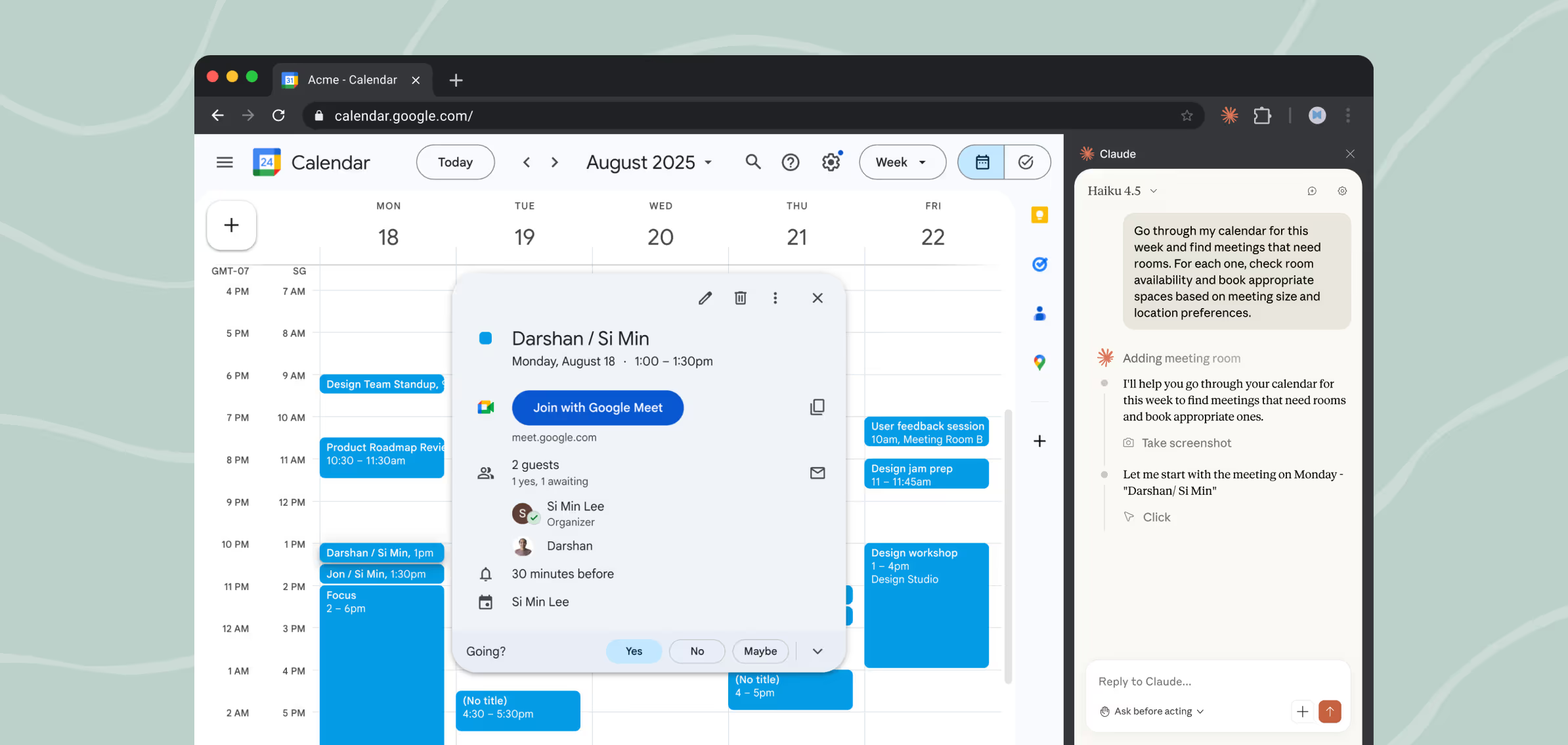
Claude for Chrome operating inside a calendar form in the leader's already-logged-in browser tab — walking the fields, typing the values, and advancing. The same pattern runs against HRIS, CRM, or ATS forms where no bulk-import API exists, turning the Friday-afternoon paste-tab tax into review-and-approve.
Source: Anthropic — Claude for Chrome

Hand Claude a spreadsheet and a form URL; it fills the form row by row.

  • Reads each row, walks the fields, types the values, submits, advances
  • Works against your HRIS, CRM, or ATS anywhere there is no bulk-import API
  • The Friday-afternoon paste-tab tax becomes review-and-approve
Apply across the business

Every system that lacks a bulk-import API becomes bulk-importable, freeing the team from the rote click-and-type tax across the org.

  • HRLoad new hires into the HRIS from the offer spreadsheet, row by row, on Day 1
  • FinanceEnter vendor invoices into the AP portal from a coded spreadsheet, reviewed before submit
  • SalesPush tradeshow lead lists into the CRM with stage, owner, and source pre-filled
  • OperationsUpdate asset records in the ticketing system from a quarterly inventory sheet
  • Product EngineeringBulk-create Jira tickets from a planning sheet with epic, labels, and assignees set
What makes this an agent Computer use against your real session, looped across a structured input, with the leader watching for the rows where the form does not match the data. The work that used to mean a Friday afternoon of paste-tab-paste-tab becomes review-and-approve.
Set this up alongside your tool stack in Part 3 · Exercise 3.2 (Toolbox + MCP).
How the four AI vendors compare: drive multi-field admin form entry inside a browser-based business system
Claude SupportedClaude for Chrome, beta on paid plans Source
ChatGPT PartialChatGPT Agent in a virtual browser, not your session Source
Gemini PartialAgent Mode preview, not generally available Source
Microsoft Copilot PartialPower Automate desktop flows, not chat-driven Source
Claude
Productivity agent (Option 2) · Organizational Leverage demo · Theme 2

Package a recurring job once, run it forever as a Skill

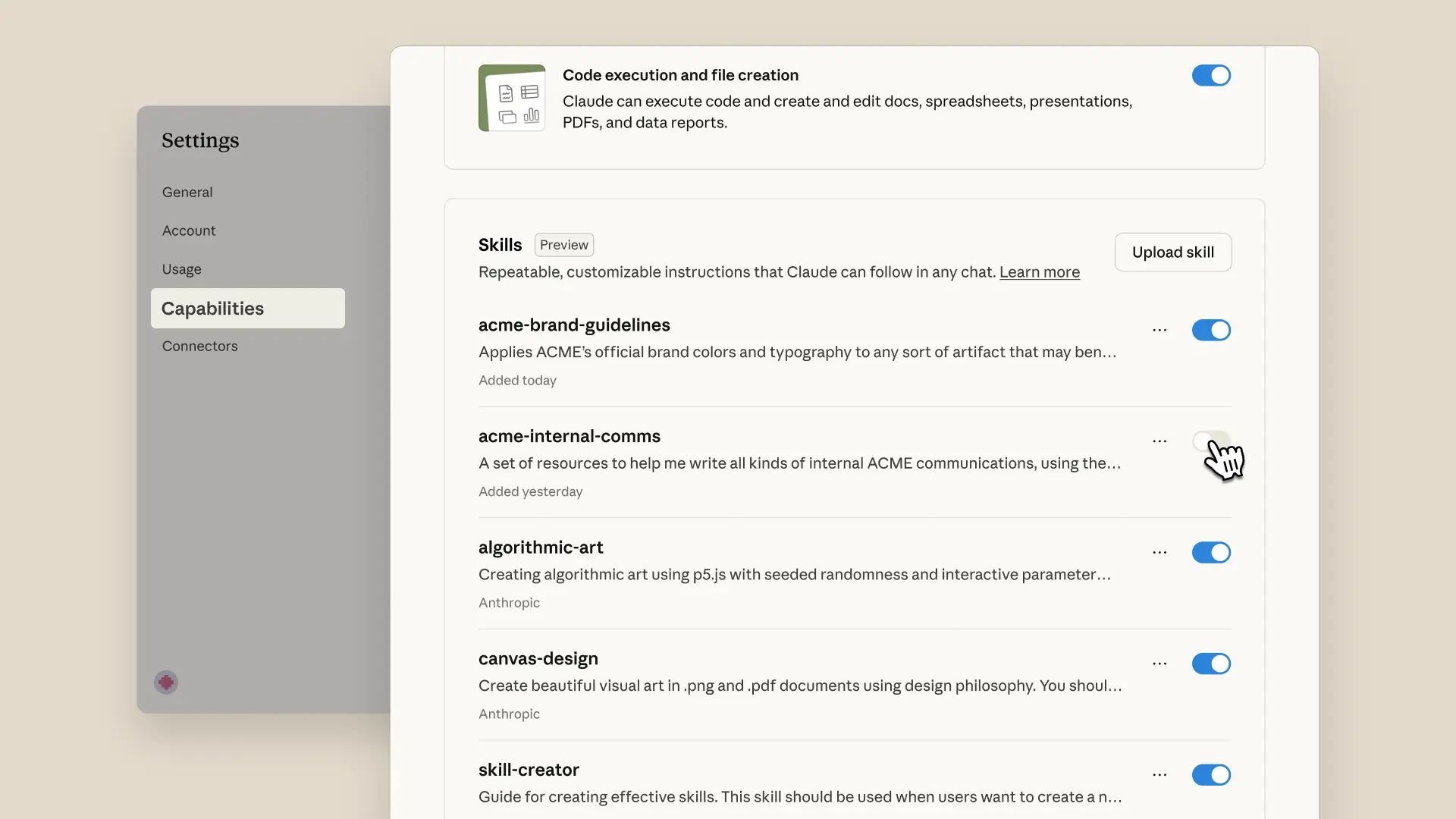
Claude.ai Capabilities settings panel listing installed Skills with toggles next to each one — the place where a leader installs and manages reusable Skills for recurring jobs.
Source: Anthropic — Introducing Agent Skills

A Skill is a saved recipe that runs itself. Bundle instructions, references, and guardrails into one named Skill.

  • Use cases: LinkedIn newsletter, weekly board update, quarterly investor brief
  • Trigger the Skill in a sentence; Claude runs the packaged workflow, not the raw chat
  • Feedback goes into the Skill, not the output. Each run gets better.
Apply across the business

Recurring deliverables stop living in someone's head. Each one becomes a named Skill the whole team can trigger and improve.

  • HROffer-letter Skill: pulls comp band, role template, signing block; runs the same every time
  • FinanceMonth-end close Skill: reconciliation checklist, variance commentary template, audit trail
  • SalesQBR-deck Skill: account metrics, win/loss commentary, next-quarter plan, branded layout
  • MarketingLaunch-brief Skill: positioning, audience, channels, success metrics in the team's template
  • Product EngineeringIncident postmortem Skill: timeline, root cause, action items, ready for review by next standup
What makes this an agent The Skill chains tools (browser, files, connectors), loads its own reference material on demand, and behaves the same way every run. You give feedback into the Skill, not the output, and the next run is better.
Build your first one in Part 4 · Exercise 4.1 (How might we…).
How the four AI vendors compare: package a recurring deliverable as a reusable Skill
Claude Supportednative Skills Source
ChatGPT Partialclosest equivalent is custom GPTs Source
Gemini PartialGems for saved instructions Source
Microsoft Copilot Partialvia Copilot agents + Studio Source
Claude
Productivity agent (Option 2) · Organizational Leverage demo · Theme 2

Ship the same report every Monday without writing it

Claude Cowork's scheduling confirmation dialog — the moment the leader sets the cadence (hourly, daily, weekly, weekdays) for a recurring task. Pair this with a packaged Skill that carries the queries, layouts, and voice, and the cadence runs itself.
Source: Anthropic — Schedule recurring tasks in Claude Cowork

Package the report once as a Skill, schedule it, stop writing it.

  • Skill carries the queries, table layouts, narrative voice, section headers
  • Scheduled tasks carry the cadence: Mondays at 7am, weekdays, or hourly
  • Each run pulls fresh numbers, assembles the deliverable, drops it where the team picks it up
Apply across the business

The recurring deliverable that used to consume a person-day every week becomes a Monday-morning email everyone walks into.

  • FinanceWeekly variance analysis, drafted with commentary, ready by Monday standup
  • SalesMonday pipeline review: at-risk deals flagged, next steps drafted, before the team meets
  • HRWeekly hiring scorecard: open reqs, time-to-fill, candidate health, sent before staff meeting
  • OperationsDaily incident summary: open tickets, escalations, vendor SLAs, in the team channel by 7am
  • MarketingWeekly campaign report: funnel deltas, top creative, recommendations, in the standup deck
What makes this an agent The Skill carries the recipe, scheduled tasks carry the cadence, and Cowork orchestrates the multi-step assembly across your tools. The leader sets the standard once, and the cadence runs itself.
Build your first packaged Skill in Part 4 · Exercise 4.1 (How might we…).
How the four AI vendors compare: run a recurring report on a schedule with a packaged Skill
Claude SupportedCowork scheduled tasks plus Skills Source
ChatGPT PartialScheduled tasks, no Skill packaging Source
Gemini PartialScheduled actions in Gemini app Source
Microsoft Copilot PartialCopilot Studio agents on a trigger Source
Gemini
Productivity agent (Option 2) · Personal Productivity demo · Theme 1

Upload your sources once, get a studio of artifacts back

Illustrative — NotebookLM Studio output tiles, generated from the leader's uploaded corpus.

Drop a corpus in, generate a Studio of artifacts from it.

  • Sources: PDFs, Docs, web pages, YouTube, all in one notebook
  • Outputs: Audio Overview, Video Overview, Mind Map, Briefing Doc, Study Guide, Flashcards
  • One corpus, six-plus formats, each grounded in the documents you uploaded
Apply across the business

One corpus, six teams generating their own briefings off it. Nobody re-reads the source docs to make the artifact they need.

  • HRUpload policies and JDs → onboarding briefings, training quizzes, FAQ for new hires
  • FinanceUpload 10-K + audit memos → investor brief, board summary, study guide for analysts
  • MarketingUpload positioning docs → sales decks, blog drafts, social cards from one source of truth
  • OperationsUpload SOPs and incident reports → training videos, checklists, briefing docs per shift
  • Product EngineeringUpload PRDs and architecture decisions → dev briefings, QA test plans, release notes
What makes this an agent The Studio runs multi-step generation against a corpus the leader owns, not the open web. Each output is reasoned across the same sources, cited back to those sources, and re-runnable when the corpus changes.
The "corpus plus reusable artifact" pattern is the warm-up for the Skill you package in Part 4 · Exercise 4.1 (How might we…).
How the four AI vendors compare: generate multi-format artifacts from a corpus the leader uploads
Claude PartialProjects plus Skills, no audio or video Source
ChatGPT PartialProjects with file context, no Studio panel Source
Gemini SupportedNotebookLM Studio, native Source
Microsoft Copilot PartialCopilot Notebooks, document outputs only Source
Microsoft Copilot
Productivity agent (Option 2) · Organizational Leverage demo · Theme 2

Researcher and Analyst agents inside your Microsoft 365 stack

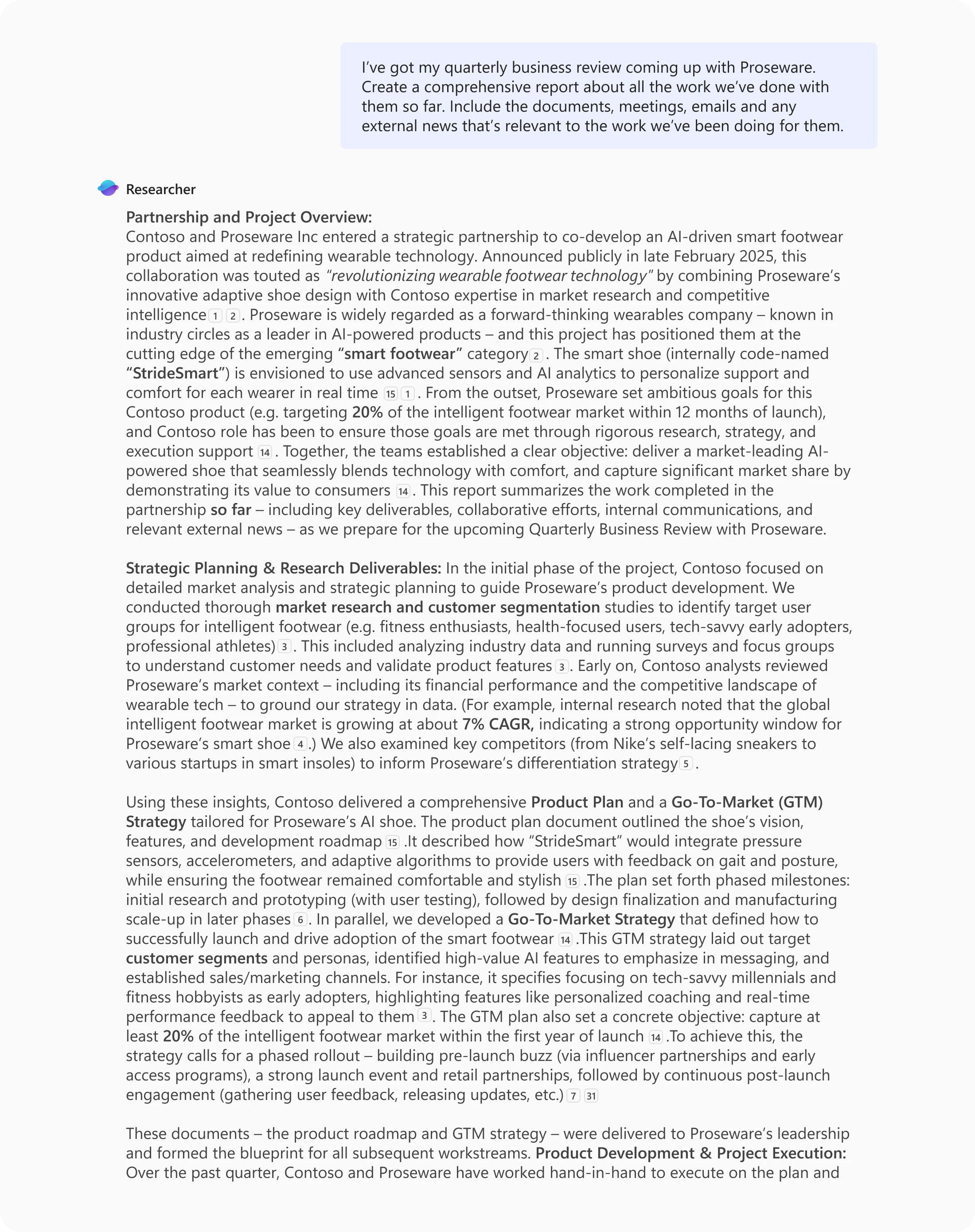
Microsoft 365 Copilot Researcher agent producing a multi-page quarterly business review report from a leader's work documents, emails, and meeting notes, displayed inside the Copilot chat surface.
Source: Microsoft — Introducing Researcher and Analyst in Microsoft 365 Copilot

If your shop runs on Microsoft, two agents ship inside the Copilot you already pay for.

  • Researcher: deep multi-source briefs from your internal docs, emails, meetings, and the web
  • Analyst: step-by-step reasoning over your Excel data with Python
  • Same agent pattern as the Claude-side examples, different vendor, same idea
Apply across the business

If the org runs on Microsoft, every function gets deep research and step-by-step Excel reasoning without procuring a single new tool.

  • FinanceAnalyst reverse-engineers a competitor model in Excel; Researcher drafts the M&A target brief
  • HRResearcher compiles a benchmarking brief on comp and benefits across named peer companies
  • SalesResearcher builds the pre-meeting account brief from emails, meetings, internal docs, and the web
  • OperationsAnalyst runs vendor-spend analysis in Excel with step-by-step Python reasoning shown
  • Product EngineeringResearcher synthesizes a technology-decision memo from RFCs, incident reports, and vendor docs
What makes these agents Multi-step reasoning over your real corpus, not single-turn chat. Different vendor, same agent pattern.
The Claude-side equivalent (deep research over your own files) is walked live in the workshop session.
How the four AI vendors compare: deep multi-source research and spreadsheet analysis with citations
Claude SupportedResearch mode + connectors Source
ChatGPT SupportedDeep Research, paid tiers Source
Gemini SupportedDeep Research in Gemini app Source
Microsoft Copilot SupportedResearcher + Analyst agents Source
3

Definitions to Know

  • Agent A chatbot assistant that takes action for you (OpenClaw, etc.).
  • Skill A pre-trained, reusable prompt for an agent that accomplishes a specific task.
  • Workflow An end-to-end sequence: a trigger fires, the agent does the heavy work, a human approves. A relay race — humans hand off to the agent, agent hands back.
2

Techniques for Today

  • How Might We

    Three magic words by Google Ventures that led to Gmail, Google Meet, Slack, HubSpot, Uber, and countless unicorn startups.

    Exercise. Reference the prompt shared in the live session earlier: How Might We, followed by the assessment brief below.

    Example prompt: How Might We + AI Readiness assessmentHow might we develop a multi-dimensional AI Readiness assessment that uses quantitative scoring. Include organizational change management as a dimension. Also, include the following question and answer format: Strongly agree, agree, no opinion, disagree, strongly disagree. Ensure the questions are easy to understand and can be linked to a prescriptive improvement program. Please try to keep it around 20 questions.
  • Chatbot Cross Check (dueling chatbots)

    Exercise. Cross check the same prompt with your other chatbot.

    Takeaway. Claude tightened the rubric; ChatGPT surfaced Governance & Ethics as a missing dimension. Combine both: Claude's scoring with ChatGPT's broader dimension set.

1

Mindset Shift to Make

From “How can I use this new AI tool?”
To “How might we optimize this Job-to-be-Done?”

Examples of Jobs-to-be-Done:

  • Draft the weekly board update.
  • Triage the inbox before standup.
  • Build the Excel model from someone else's data dump.
  • Prep the prospect outreach for HubSpot or LinkedIn.
Part 1 of 4 · Techniques

Techniques Set up your primary chatbot and your thinking so AI starts compounding instead of feeling like a chore

Two Options for where AI plugs into your work

The first call you make as a leader isn't which model to use. Every major model is good enough now. The call is the direction of integration: do you bring AI into the tools you already work in, or do you bring those tools into AI?

Option 1

Bring AI into your existing tools

Be more productive with manual work.

What this looks like

  • Claude for Chrome drives the browser you already log into.
  • Gemini in Gmail drafts, summarizes, and triages inside the inbox.
  • Microsoft 365 Copilot in Excel and Word sits next to the cell or paragraph you're already editing.
Option 2

Bring your existing tools into AI

Give AI more context to do automatic work.

What this looks like

  • Claude Skills + MCP connectors plug your business systems into Claude.
  • ChatGPT Projects + connectors persist files, instructions, and access in one workspace.
  • Microsoft 365 Copilot agents (Researcher + Analyst) reason multi-step over your real corpus.

Exercise 1

Configure your primary chatbot: privacy off, adaptive reasoning system prompt, cross-platform fit

Three settings to flip once, then never again. Each one changes how every chat goes for the next 12 months.

Exercise 1.2

Privacy, system prompt, custom instructions, and the cross-platform map

Step 1 Turn the privacy / training-data toggle off in each chat surface.

Open your primary chatbot's settings (click your initials or account icon — usually top-right), find the privacy / training-data toggle, and switch it off. These toggles are usually on by default (a dark pattern the live session flagged), and they send your conversations to model training. Repeat for every chat surface you'll touch in the next four Parts.

ClaudeSettings → Privacy → "Help improve Claude" → off.
ChatGPTSettings → Data Controls → "Improve the model for everyone" → off.
Microsoft CopilotTenant admin may have already enforced enterprise data protection; confirm with IT.
GeminiActivity controls → "Gemini Apps Activity" → off.
Regulated industries If cloud LLMs are a no-go (finance, healthcare, etc.), talk to your IT lead before connecting business data in Parts 3 and 4.
You'll know you've got it whenthe privacy toggle is off in every chat surface you'll touch in the next four Parts.
Step 2 Paste the adaptive reasoning system prompt into your primary chatbot's instructions field.

Open your primary chatbot's settings and find the system prompt / custom instructions / general instructions field — a one-time text box, separate from where you type chats. Paste the prompt below exactly as-is; the names inside ("Atom of Thought", "Feynman Loop") are workshop labels you don't have to decode — the prompt does the work. What changes: the chatbot stops giving one linear answer and starts thinking in parallel, the way a strategy team would.

ClaudeSettings → General → overall system prompt field.
ChatGPTSettings → Personalization → Custom Instructions → "Anything else…" field.
Microsoft CopilotYour personal agent's instructions, or your tenant's enterprise system prompt.
GeminiGems → create / edit a Gem → Instructions field.
System prompt — paste into your primary chatbot's instructions fieldUse the Adaptive Reasoning Protocol: Assess the request type, then apply the appropriate method: If solving, analyzing, or debugging → Atom of Thought: Decompose into atomic reasoning units. For each atom: State the logical component Validate independence Verify correctness Then synthesize atoms into final answer. If explaining, learning, or teaching → Feynman Loop: Explain as if teaching a curious beginner. For each cycle: Use a concrete analogy Flag confusion points Ask questions that reveal gaps Then compress into a teachable snapshot. If both are needed → Chain them: First solve via Atom of Thought, then explain the solution via Feynman Loop.
You'll know you've got it whenasking your chatbot "what instructions are you operating under right now?" returns content that came from the block above, and a follow-up like "draft three approaches to my Monday all-hands" returns at least three substantively different angles instead of one.
Step 3 Add a one-paragraph "who I am" block to custom instructions / memory.

Six lines: role, voice, decision filters, current priorities, closest collaborators, and the leadership behaviors you're working on. This carries across every chat. You're filling out the chatbot's "remember about me forever" field — each vendor calls it something different. Paste it into your primary chatbot's profile / custom instructions / memory field (see the row below for your tool), and mirror it to the adjacent tools you keep open.

ClaudeSettings → Profile (or the equivalent for your tier).
ChatGPTCustom Instructions ("What would you like ChatGPT to know about you") + Memory.
Microsoft CopilotYour personal agent's instructions or your tenant profile.
GeminiSaved info.
Template — your "who I am" blockRole & remit: I am [name], [title] at [company]. I [scope, P&L if any, who reports to me, who I report to]. Voice: I write in [short sentences / contractions / no exclamation marks / etc.]. I do not say [list — e.g., "circling back", "just to clarify", "exciting"]. Decision filters: When I decide, I ask [3–5 of your real filters — e.g., "smallest reversible step", "does this compound", "what would my chair do"]. Current priorities: My top three this quarter are [three numbered items]. People model: My closest collaborators are [first names, one line on each]. What I am working on improving: [two leadership behaviors I am deliberately practicing].
You'll know you've got it whenasking each chatbot "what do you know about me?" returns at least three specific facts from your block, not generic flattery.
Step 4 Map the cross-platform fit so you're not debating "which one is best."

Use the matrix below. Your job here is to commit to one primary surface and decide which adjacent tools you keep open for which jobs.

ClaudeStrong general-purpose agent; skills + projects + schedules + computer use all live here.
Microsoft CopilotThe path inside the Microsoft 365 stack (Outlook, Teams, SharePoint, OneDrive, Excel). Microsoft Copilot Cowork brings Claude into the Microsoft tools, and for a Microsoft shop this is the strongest enterprise path.
ChatGPTConsumer product strengths: custom GPTs you can share, broad tool options, fast iteration, strong image / data analysis surface.
GeminiNotebookLM for source-grounded research, Nano Banana for image generation, strong computer vision for handwritten receipts and screenshots.
You'll know you've got it whenyou can finish the sentence "[Claude / ChatGPT / Copilot / Gemini] is my default; I keep [one of the other three] open for ___" with a real reason.
Step 5 First test of the configured surface.

Run this one prompt in your primary chatbot. It exists only to confirm the system prompt and the "who I am" block both fired.

Smoke-test prompt — run in your primary chatbotBased on what you know about me from my custom instructions and your system prompt: what are three substantively different angles on the single biggest leadership move I should be making this quarter? For each angle: the assumption it makes about me, the one risk, and the smallest reversible first move.
You'll know you've got it whenyour chatbot returns three angles (not one), each with an assumption + risk + first move, and at least one of the three points back at a specific fact in your "who I am" block.
Start your own custom Agent Skills with this template

Agent Skills turn the workflows you run by hand every week into something Claude can invoke on demand — your own slash commands for the work that lives in your head. This file is a working skeleton you can fork: rename it, swap the role / goal / protocol / deliverables, and you have your first custom Skill. The sea-of-demand example doubles as a real ICP-research workflow if you want to run it as-is first.

Download Agent Skills

Q&A

Open discussion

  1. Which Option are you going with, Option 1 (bring AI into your existing tools) or Option 2 (bring your existing tools into AI), and what's the one tool you're going to start in?
  2. What repetitive task are you hoping AI will absorb, and how many hours per week has it been costing you?
  3. Anything else about AI tools, or a specific task you want to tackle with AI?
Part 2 of 4 · Strategy

Pick the right work for AI Write 2-3 Jobs to be Done, score them with RICE, lock in #1 for Parts 3 and 4

J
Jobs to be Done

Outcome-shaped, not task-shaped.

  • Situation: recurring (weekly or more often).
  • Motivation: revenue, a real hour saved, or a pain removed.
  • Outcome: observable at a glance — you can tell whether the Job got done.
R
RICE prioritization

(Reach × Impact × Confidence) ÷ Effort.

  • Reach × Impact: how often it runs, how meaningful when it does.
  • Confidence: 1 to 10, calibrated honestly.
  • Effort: data, toolbox, and computer-use availability.

Exercise 1

Exercise 1: Jobs to be Done

Exercise 2.1

Write 2 to 3 Jobs in "When X, I want Y, so I can Z" form

Step 1 Read the frame. Read the two live-session examples.

The canonical frame, in the live session's words:

When ___, I want to ___ so I can ___.Situation + motivation = outcome

The frame forces specificity. "Use AI for marketing" is not a Job. Two examples, verbatim:

Live-session example 1: newsletter publish

When we have a newsletter that's approved, I want to automatically post it on LinkedIn to drive conversions and traffic.

Live-session example 2: leads to connection request

When we get a new lead, I want to automatically send a connection request.

Both run as live demos in Part 4 — see the newsletter publish walk-through below.

Done when:you can read both examples aloud and spot the situation, motivation, and outcome inside each.
Step 2 Write 2 to 3 Jobs of your own. Don't edit. Just get them down.
  • Don't edit the idea. Just get 2 to 3 down on the page.
  • Reframe the question: not "what can I do with AI" but "how can I work differently by understanding AI."
  • If you can't think of one for yourself, think of something a colleague would want done.
What makes a good Job
  • Situation: recurring (weekly or more often).
  • Motivation: honest — revenue, a real hour saved, a pain removed.
  • Outcome: observable at a glance.
You'll know you've got it wheneach Job is one sentence and follows the "When X, I want Y, so I can Z" frame end-to-end. Stop at three this round.
Step 3 Have Claude pressure-test your Jobs and propose 2 more.

Paste your Jobs into Claude. Run this prompt.

Prompt — Pressure-test and expand the Jobs listRole: You are my Jobs-to-be-Done partner. You have my custom instructions and your adaptive reasoning system prompt loaded. Goal: For each of the Jobs I pasted, return: (a) whether it is truly outcome-shaped or a task in disguise; (b) one situation I likely under-specified; (c) one motivation I might be hiding from myself. Then propose 2 additional Jobs you would expect from someone in my role with my priorities. Use the canonical "When X, I want Y, so I can Z" frame for each. Constraints: No generic Jobs. Each candidate must reference something specific from my custom instructions or current priorities. Push back where my Job is really a task. My current Jobs: [paste your 2 to 3 Jobs here]
Done when:you have a clean list of 4 to 5 Jobs total: your originals lifted to outcome form, plus 2 Claude proposed.
Step 4 Write the Theme 2 carry sentence for your locked-in Job.

The carry sentence is the one line that hands the Skill to the team — who runs it, and why. For your locked-in Job, write it in canonical form:

When this Skill is good enough, [team / function / role] will run it because [reason].Theme 2 carry sentence
Confirmed when:the carry sentence names a specific team, function, or role and a one-line reason, not a category.

Exercise 2

Exercise 2: RICE prioritization

Exercise 2.2

Score your 3 Jobs with RICE, then lock in #1

Step 1 Score your 3 Jobs with RICE.
ReachHow often or how broadly the Job is used. Weekly is high. Quarterly is low. Org-wide beats team-only. Reach naturally weights Organizational Jobs higher; that's the right tension.
ImpactHow important to the business: nice-to-have versus mission-critical.
Confidence1 to 10. Calibrated honestly, not aspirationally.
EffortHow hard to deliver. Is the data available, the toolbox in place, computer-use available if there's no API?
RICE formula(Reach × Impact × Confidence) ÷ Effort
The $10 task vs. the $1,000 task Tech Leaders idiom: "$10 work" is the repetitive stuff (formatting, copy-pasting, scheduling) that steals time from the "$1,000 work" only you can do. The right Job for AI often isn't your most critical activity — it's the work that steals time from your most critical activity.

Paste your 4 to 5 Jobs back into Claude. Run this prompt.

Prompt — RICE scoring, score 3 and pick 1Role: You are my prioritization partner. You have my custom instructions and the Jobs to be Done list above. Goal: Score every Job with RICE. Return a single Markdown table sorted by RICE descending, then a one-paragraph recommendation on the Top 3 and which one to build first. Constraints: Push back on any Reach or Impact number I might be over-claiming. If a Job has Confidence below 5, ask if it belongs on the list. If two Jobs collapse into one workflow, flag it. After scoring, apply the live-session reframe: the right pick may not be the most critical activity. It may be the work that steals time from the $10 task. For each Top 3 Job, also note time-by-task, value-by-task, and what it steals from.

Top 3 = your #1 plus your queue. That's the unit of planning for Parts 3 and 4.

You'll know you've got it whenyou have a Top 3 sorted by RICE with the time-steal lens applied, and you can explain in one sentence why your new #1 is #1.
Step 2 Lock in #1. Write it cleanly in canonical form.

Pick one Job. Write it cleanly in the canonical frame with the rationale. This is the one you carry into Parts 3 and 4.

Sample: locked-in Job for Part 3

Job: When we have a newsletter that's approved, I want to automatically post it on LinkedIn to drive conversions and traffic.

RICE: Reach 52 (weekly), Impact 2, Confidence 9, Effort 0.5. Score = 187.

Time-steal: 45 minutes per week of formatting and copy-paste, steals from the $10 work of writing the next piece. Net 30+ hours per year reclaimed.

Sandbox safety: low-risk first build, a draft for review, not auto-publish.

Sandbox first Don't make your first AI build your most critical business process. Pick a practice version — something you can break without consequence. If your locked-in Job is mission-critical, find a low-stakes variant first (workshop name: sandbox).
You'll know you've got it whenyou have one Job written cleanly with RICE, time-steal, and low-stakes-first notes, and you'd defend the pick to a peer.
Q&A

Open discussion

  1. Which Job did you lock in, and what makes it the one that steals time from your $10 task?
  2. Where did Claude's pressure test surprise you (did it expand a Job, or narrow one)?
Theme 2 of 2 AI for Organizational Leverage Parts 3 + 4 with Q&A

Build something your team can run

Design the workflow (Part 3), then build, schedule, and chain the Skill (Part 4). At every step, write instructions as if you were onboarding a new teammate. The Skill you ship is what your team or function can run without you.

Theme 2 entry move: carry your Option forward, but reframe the work. If you picked Option 1, name the team member whose Outlook / Excel / Chrome you'd roll this out to next. If you picked Option 2, name the function whose connectors you'd plug into next. Write the name. The Skill you build in Part 4 is for them, not just you.

Theme 2 is where personal productivity becomes a workflow your team can run. Budget the time. Part 4 walks one live demo end-to-end; the other agent patterns get walked through in the workshop session.

Warmups before you start

Hold these in mind as you begin Theme 2

Part 3 of 4 · Tactics

Design the workflow Map onto 10 / 80 / 10, build the toolbox, treat AI as a teammate

  • Map your Job onto 10 / 80 / 10.
  • Spec it: trigger → steps → done → edge cases.
  • Wire the toolbox: hook Claude into your business apps (MCPs), with browser-driving as the fallback (computer use).

Part 2 picked the Job. Part 3 designs the workflow that delivers it. 10 / 80 / 10 is the same shape as briefing a new hire: 10% setting up the context and data, 80% them doing the work, 10% you reviewing before it ships.

10
Front 10% — Human-in

What the agent needs before it can start.

  • Data, the latest input, the relevant rows.
  • Approvals and gating decisions.
  • Context: brand voice, role, what good looks like.
80
Middle 80% — AI heavy lifting

Research, extraction, drafting, processing.

  • Faster than a human, in parallel.
  • Processes more, repeats reliably.
  • The actual work — once the 10s are real.
10
Back 10% — Human-after

Approve, reject, one note back to the Skill.

  • Not line-editing the deliverable.
  • Feedback goes into the Skill, not the output.
  • Definition-of-Done check before shipping.
AI is less a tool than a teammate. Onboard it. Review its work. Don't push buttons.

Exercise 3

Exercise 3: Map the workflow on 10 / 80 / 10

Exercise 3.1

Trigger, Steps, Definition of Done + Edge Cases across 10 / 80 / 10

Step 1 Write the Trigger and Inputs (the front 10%).

For the Job you locked in at the end of Part 2, name:

  • Trigger: what kicks the workflow off. A schedule (every morning at 6 a.m.), a new record (a new lead), or you typing "run this skill" by name.
  • Inputs / dependencies: what data, what approvals, what apps and systems someone opens to do this Job today.
Sample: newsletter publish Job
  • Trigger: a newsletter row in Airtable is marked Approved, sorted by date, status = approved.
  • Inputs: the Airtable row (text + image references), the linked Google Drive image, a logged-in LinkedIn account in the browser.
You'll know you've got it whenboth the trigger and the inputs are written concretely. A peer could run the workflow by hand from them.
Step 2 Write the Steps (the middle 80%).

Describe the steps the way you'd brief a new teammate. Imperfect bullets are fine.

Sample: newsletter publish Steps
  1. Pull the most recently approved newsletter row from Airtable.
  2. Pull the linked image from Google Drive.
  3. Open LinkedIn in the browser (already logged in).
  4. Open the newsletter editor and start a new article.
  5. Paste in the title, the body, and the image. Preserve the formatting exactly as it is in Airtable.
  6. Stop at "Draft for review." Notify me. Do not auto-publish on this first run.
You'll know you've got it whena peer could hand off the workflow to a new hire using only your list.
Step 3 Write the Definition of Done and the Edge Cases together.
  • Definition of Done: the finish line you can see in 30 seconds. If you can't eyeball whether the agent finished the job, you haven't defined it. Specific. Bold. Observable.
  • Edge Cases: the weird inputs that break the agent. Write what should happen when data is missing, wrong, or marked DRAFT. Each one is a stop-rule (workshop name: "if X, stop" guardrail, or "soft kill switch").
Sample: newsletter publish Definition of Done + Edge Cases

Definition of Done: Newsletter drafted on LinkedIn with formatting matching the Airtable row exactly; human reviewer approves in 5 minutes or less and clicks Publish. Net 45 minutes per week reclaimed.

  • LinkedIn's editor mangles bold and bullet formatting on raw paste. Agent must reconstruct formatting natively, not copy-paste.
  • If the linked Drive image is missing or 404s, stop and notify; do not publish without the image.
  • If two rows are both Approved with no clear "next," sort by approval date and pick the oldest. Flag for review.
  • If the title contains "[DRAFT]" or "[TEST]", stop. Do not publish.
You'll know you've got it whenDefinition of Done is observable in 30 seconds tied to a measurable outcome, and at least three edge cases are written with at least one explicit "if X, stop" guardrail.

Exercise 4

Exercise 4: Your toolbox: MCP connections + computer use

Exercise 3.2

The toolbox: MCP connections + computer use

Step 1 List the tools your business already runs on.

More context = better skills. Aim for 5 to 10 systems your business actually uses.

  • CRM
  • Project management / issue tracker
  • Analytics
  • Databases
  • Email / calendar / docs / drive
  • Industry-specific tools
Rolling this out to a team List the connectors the team's stack already has, not just your personal stack.
Done when:you have a written toolbox list with at least 5 systems your business actually uses.
Step 2 Map the Job's toolbox: which MCPs does it need?
  • MCP: the standard plug between Claude and your apps — USB-C for AI. One shape, fits Airtable, HubSpot, Drive, GitHub, Linear, Slack. You'll find them in Claude's Connectors menu.
  • Computer use: Claude sits at your already-logged-in browser and clicks and types like a contractor over your shoulder. The fallback for anything that doesn't have an MCP plug.
  • Hosted server: for older or homegrown systems with no off-the-shelf connector, your IT team or partner can build one (workshop name: hosted MCP server). Out of scope today — flag it as a "later" item.
Sample: newsletter publish toolbox
  1. Airtable (content store): MCP, native in Claude's Connectors.
  2. Google Drive (image source): MCP, native.
  3. LinkedIn: no MCP. Use a logged-in browser session via computer use.
Done when:every system the Job needs is mapped to either an MCP connector or a "computer use via logged-in session" path.
Step 3 Connect the MCPs in Claude. Verify each one.

In Claude, click your initials (top-right) → Settings → Connectors. Each row is an app. Click "Authorize" next to the apps your Job needs — a window from that app will pop up asking permission; click Allow. The row flips to "Connected." Then verify each one with a real-data question — something only your actual data can answer.

Verification prompts — paste one per connectorlist the most recent five rows in my [Airtable base] table what is the most recently modified file in my [Drive folder]
Login risk note Claude doesn't get your password. It uses the already-logged-in session. If you're regulated, treat it the same way you'd treat a contractor with access to your open browser.
Confirmed when:each MCP returns real data from your business when you ask a grounded question.

The kill-switch template moves to Ex 4.1 (paste-in block inside the Skill build).

Now what to do next

Close Part 3: what you walk away with

Before you close the tab:

  1. Save the workflow spec for the locked-in Job (Trigger, Steps, Definition of Done, Edge Cases) on a single page.
  2. Confirm the toolbox: every MCP connector is authorized and verified; computer-use fallbacks are noted for systems with no MCP.
  3. In the next 24 hours: walk a peer or report through the workflow spec out loud. If they can run it manually, the agent will too.
Watch out for these (Part 3)
  • Skipping the Definition of Done. Without it, ROI is ambiguous and the agent has nowhere to aim.
  • Treating "AI as a tool" instead of "AI as a teammate." The instructions you write are onboarding, not button labels.
  • Authorizing MCPs without testing them. If the verification query returns a generic answer, the connector is not loaded.
  • Skipping the workflow spec walk-through with a peer. If they can't run it manually, the agent will hit the same blockers.
Q&A

Open discussion

  1. What's in your toolbox today that doesn't have an MCP yet, and how are you planning to bridge that gap?
  2. Which step of the 10/80/10 is the hardest to write for your locked-in Job: the trigger, the back-10% review, or the edge cases?
Part 4 of 4 · Practice

Build the Skill "How might we…" meta-prompt + sandbox build + first validated run

A meta-prompt asks Claude to design the Skill, not run it. You scope the outcome; Claude proposes the steps — the same way you'd brief a consultant before they execute.

  • Write your "How might we…" meta-prompt and answer Claude's clarifying questions.
  • Generate and install your first Skill (low-stakes first build), with stop-rules baked in.
  • Validate one run that hits your Part 3 Definition of Done.

"How might we…": the three-word prefix that gets you out of the How Trap

The How Trap is jumping to "how do I do this in Claude?" when the real question is "what outcome do I want?" Describe the destination. Claude will propose the steps. The three-word prefix changes what Claude produces: instead of a one-time answer, it generates a reusable Skill.

  • Paste in your Part 2 Job + Part 3 workflow + Part 3 toolbox.
  • Let Claude ask 2–5 clarifying questions before it generates.

Exercise 4.1

Build your first skill: "How might we create a new skill to ___"

Exercise 4.1

Meta-prompt -> clarifying questions -> generated skill -> first validation run

Step 1 Confirm chat vs Cowork.

Cowork is Claude's separate desktop app — the one you launch when the Skill needs to click and type in a browser, not just chat. Same Claude underneath; different surface.

Claude chat

If no step drives a browser or desktop app.

  • Auto-installs on generation.
Claude Cowork

If any step drives a browser or desktop app — LinkedIn, PowerPoint, a logged-in CRM tab.

  • Install manually inside Cowork: click your initials → Settings → Capabilities → Skills → Customize.
You'll know you've got it whenyou've written "chat" or "Cowork" next to your Job and you've opened the right surface.
Step 2 Write your "How might we" meta-prompt.

Paste in your Part 2 Job + Part 3 workflow + Part 3 toolbox. Describe the outcome, not the steps.

Meta-prompt template — paste into Claude (chat or Cowork)How might we create a new skill (or set of skills) to do [your Job to be Done in canonical form]. Workflow context (from my Part 3 spec): - Trigger: [paste] - Inputs / dependencies: [paste] - Steps as I currently understand them: [paste] - Definition of done: [paste] - Edge cases: [paste] - Kill-switch rules (if X, stop): [paste] Toolbox (from my Part 3 toolbox map): - MCP connectors authorized: [list] - Systems with no MCP that you'll drive via computer use: [list] Ask me clarifying questions before generating the skill. Where my spec is silent, ask — don't guess. Where you have a better way to structure a step than I described, propose it. The point is the outcome, not the steps I wrote.
Optional addition for Theme 2 Organizational arc Append one line to your "How might we…" prompt: ". . . and design it so [name the team or function] can run it without me in the loop within two weeks." That's the Theme 2 hinge. The Skill stops being "mine to run" and becomes "ours to run." Use the team / function you wrote in your Part 2 Theme 2 carry sentence.
One suggested first build for Theme 1 If your Job is content-shaped (talks, decks, newsletters), try the Elevate slides Skill: feed your deck + speaker notes, let Claude deliver the talk-track on demand.
You'll know you've got it whenthe meta-prompt is one block, ends with "ask clarifying questions before generating," and includes the kill-switch rules from Part 3.
Step 3 Answer Claude's clarifying questions.

Claude asks 2 to 5 clarifying questions before generating. Answer concretely — or say "I don't know, please research this and propose." You don't have to know the steps. You have to know the outcome.

From the live session: audience question #1
What if I don't know where the data lives?

An audience question asked: how do I do this when I don't know what tools or data are even out there for the new approach? People online are getting data I don't know how to get.

The live-session answer: two legitimate channels, (1) publicly available and (2) accessible via your logged-in browser. Claude can do both. If you don't know the steps, ask Claude to research the steps for you, then become the human in the loop on the result. You don't need to know the research method. Ask Claude to find it, then review what comes back.

A live-session frame: "It's almost as loose as that. You're working with a very strange new employee that doesn't know your subject matter but is an expert in finding out."

Source: live-session Q&A, 2026-05-13.

You'll know you've got it whenyou've answered every clarifying question with a specific answer or an explicit "I don't know, please research and propose."
Step 4 Answer Claude's questions and ship: generate, install, validate.

Claude generates the Skill. If chat, it auto-installs. If Cowork, install under Settings > Capabilities > Skills > Customize.

Paste these stop-rules into the Skill's instructions. They tell the agent the conditions where it has to halt and ping you, instead of guessing. (Workshop name: the kill-switch template.)

Stop-rules — paste into the Skill's instructionsIf any of the following are true, STOP immediately and notify me: - The title or content contains [DRAFT], [TEST], or [HOLD]. - The data source returns zero rows or a 404 / 5xx error. - The action would touch a [list of high-stakes accounts or contacts]. - Any required input is missing or null. - You are not certain you understood my instruction. Ask one clarifying question instead of guessing. Be literal. The more literal the better.
  • Run the Skill once. Sandbox-safe.
  • Watch Claude show its work. If anything looks off, hit Stop.
  • Add a literal instruction to the Skill. Be literal. That's the back-10%.
Feedback into the skill, not the output Spend your time making the skill better, not the deliverable. The default instinct is to edit each output directly. Put that time into the Skill instead.

Once the Skill works, put it on a schedule (hourly, daily, weekly, weekdays). In Cowork, you'll see a Schedule option on the Skill's settings; in chat, ask Claude "schedule this skill to run every Monday at 7am."

You'll know you've got it whenthe Skill is installed, the kill-switch lines are pasted in, and the Skill has produced one output that satisfies your Definition of Done (or you've added one new instruction so the next run will).

Demo walk-through

Live demo walk-through: LinkedIn newsletter publish

The canonical "How might we…" build. Use it as a template if your Job is "data store → transform → browser action."

Demo 1

LinkedIn newsletter publish: Airtable -> Google Drive -> browser -> LinkedIn

Job to be Done

When we have a newsletter that's approved, I want to automatically post it on LinkedIn to drive conversions and traffic.

Toolbox
  • Airtable (content store): MCP connector, authorized in Claude Settings.
  • Google Drive (image source): MCP connector.
  • LinkedIn: no MCP. Logged-in browser session driven via computer use.
The verbatim "How might we…" prompt from the live session
Prompt — exact live-session wording, paste verbatimHow might we create a new skill that pulls the next scheduled newsletter content from Airtable and posts the content formatted exactly as it is in Airtable as a new LinkedIn article starting at this page.
The three clarifying questions Claude asked
  1. Which Airtable base holds the newsletters? The live session shared a link to a sample post; Claude figured out the table and key field details from the link.
  2. How should the skill determine which newsletter is "next"? By date and by approved status (most recent approved).
  3. Auto-publish or stop for review? Draft and stop for review (the back-10% human check, since this was the first run).
Human-on-the-loop validation
  • Skill generated, ran, pulled the linked image from Google Drive (it wrote the retrieval code itself).
  • Opened LinkedIn in the browser, drafted the newsletter formatted correctly on the first try.
  • Live-session host reviewed and clicked Publish. Zero formatting errors — historically humans had several.
Now what to do next

Close Part 4: what you walk away with

Before you close the tab:

  1. Confirm the Skill is installed (auto-installed if you built in chat; installed under Settings -> Capabilities -> Skills -> Customize if you built in Cowork).
  2. Confirm one validated run exists: the Skill produced an output that satisfies your Definition of Done from Part 3.
  3. Save your "How might we…" prompt and the clarifying-question answers in your notes. You'll reuse the pattern on every subsequent skill.
  4. Loop back to your Part-2 Jobs list. Pick the next-priority Job. Schedule a time to start the loop again.
Watch out for these (Part 4)
  • Building your first Skill on your most critical business process. Sandbox first.
  • Over-prescribing the steps in the "How might we…" prompt. You care about the outcome. Let Claude propose the steps.
  • Guessing on Claude's clarifying questions. If you don't know, say "research it and propose, then ask me to confirm." That's a legitimate answer — the Skill will still generate correctly.
  • Building in chat when you need computer use, or in Cowork when you don't. Re-check the chat vs Cowork decision at Step 1.
  • Editing the output instead of editing the Skill. The back-10% feedback goes into the Skill, not the deliverable.
  • Skipping the loop back to the Part-2 Jobs list. Each Skill you add multiplies the last one; the next-priority Job is already scored and waiting.
Q&A

Open discussion

  1. Did Claude ship a Skill that satisfied your Definition of Done, or did you have to add an instruction back? Which one?
  2. What's the second Skill you'd build next week, and what does it chain to?