
How To Use MoSCoW for User Story Mapping
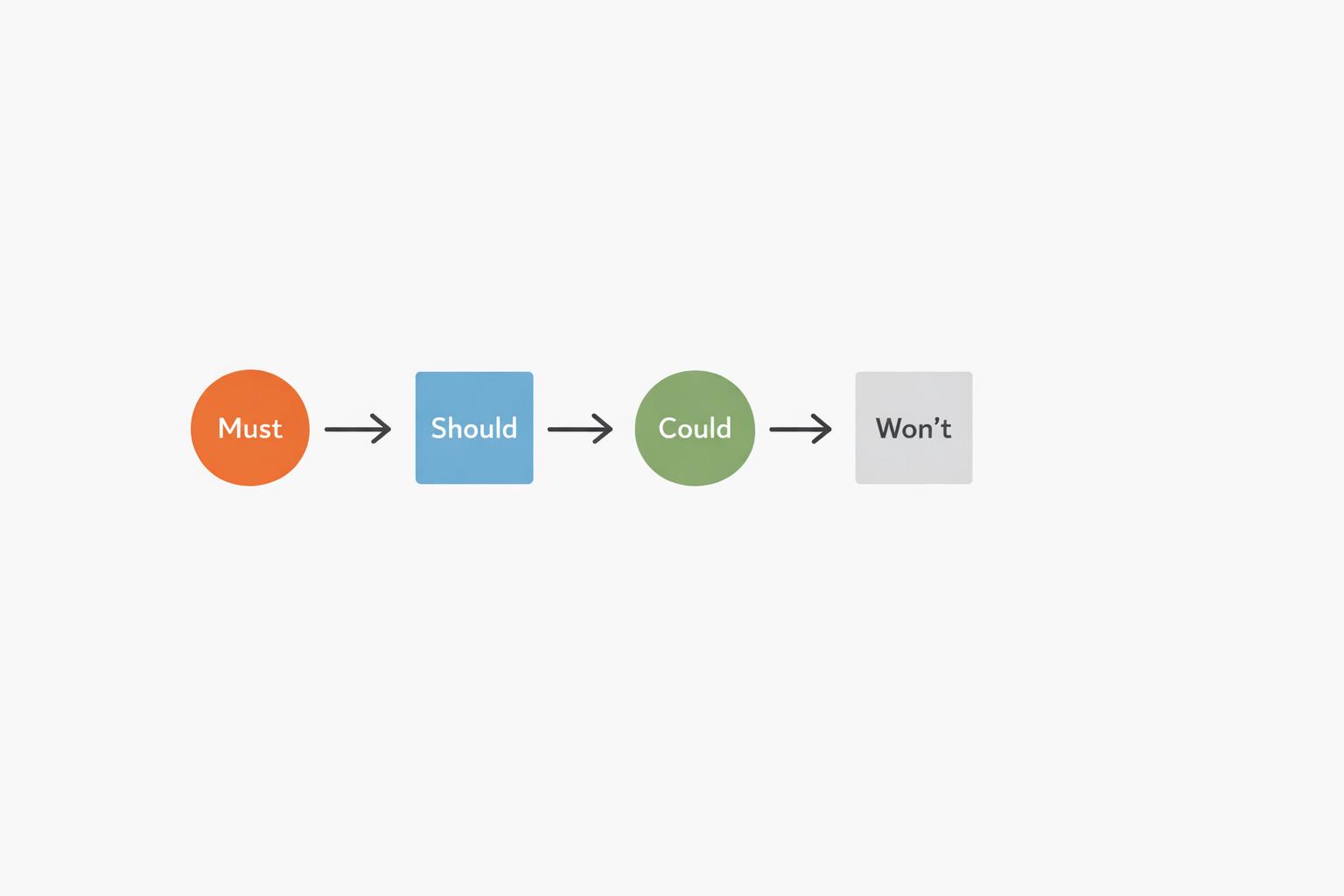
MoSCoW prioritization and user story mapping can simplify product development by helping teams focus on what matters most. MoSCoW categorizes requirements into Must Have, Should Have, Could Have, and Won’t Have, ensuring clear priorities within tight constraints. User story mapping visualizes the user journey, breaking tasks into manageable increments. Combining these methods ensures your product delivers the right features, avoids unnecessary scope, and stays aligned with goals.
Key takeaways:
- MoSCoW Framework: Focuses on critical needs (Must Haves) while providing flexibility (Should/Could Haves).
- User Story Mapping: Organizes tasks into a user journey and slices them into deliverable increments.
- Integration Benefits: Prioritize features effectively, avoid scope creep, and align stakeholders.
How to prioritize backlog items on the user story map
Preparing for MoSCoW-Based User Story Mapping
Getting ready for a MoSCoW-based user story mapping session requires careful planning. Without proper preparation, you risk ending up with unclear priorities and scope creep. By setting clear goals and assigning roles early, you can ensure the process stays on track and focused.
Define Goals and Constraints
Start by defining what project success looks like. A shared understanding of success helps avoid competing priorities. For example, your goal might be to launch an MVP by a specific date, boost user engagement by a measurable percentage, or meet a regulatory deadline.
Next, decide on the prioritization criteria you'll use to rank user stories. Will you focus on business value, technical complexity, legal requirements, or user impact? Agreeing on these factors ahead of time ensures that not every feature is treated as critical. Use these criteria to clearly assign Must Haves, Should Haves, and Could Haves within the MoSCoW framework [1].
Document any hard constraints like release dates, budget limits, team size, or technical expertise. For instance, if your engineering team is only experienced with React, that will shape what features are feasible. Similarly, set non-negotiable deadlines upfront to manage expectations.
Finally, establish a dispute resolution process before the session. Disagreements over feature priorities are inevitable, so decide who will have the final say. For example, disputes could escalate from the Product Owner to the Business Visionary and, if needed, to the Executive Sponsor. Having this process in place ensures that conflicts don’t derail the session [1].
Identify Key Participants
The success of your session depends on involving the right people. Consider this advice:
"Create story maps with the entire Scrum team present, including the product owner (to answer questions and to lay out the focus of the map...) and the Scrum Master (to facilitate)" [9].
Here’s a breakdown of key roles and their responsibilities:
| Role | Primary Responsibility |
|---|---|
| Product Owner | Defines the MVP and project objectives, leads the discussion, and finalizes priorities. |
| Scrum Master | Facilitates the session, ensures adherence to MoSCoW rules, and keeps the session on schedule. |
| Developers/Tech Lead | Assesses feasibility, identifies dependencies, and estimates the effort required. |
| Business Visionary | Explains the business value, justifies Must Have features, and aligns priorities with ROI. |
| Stakeholders/Users | Share insights into user needs and help rank features based on desirability. |
Once the roles are clear, you’re ready to gather the necessary data and inputs.
Gather Inputs and Data
To base your session on solid ground, rely on factual data. Start with user research and analytics to uncover what users struggle with and which features they actually use. Studies show that 45% of software features go unused, while only 7% are consistently utilized [8]. This insight can help you focus on what truly matters.
Next, compile a list of potential requirements. This step sets clear boundaries and reduces the risk of scope creep. Include technical constraints from your engineering team, such as dependencies, architectural limits, or integration challenges that could make certain features unworkable.
Gather business metrics like expected ROI, the number of users each feature might impact, and the potential cost of delay if a feature isn’t implemented. These metrics are essential for assigning features to the appropriate MoSCoW categories.
"MoSCoW is a practical prioritization framework for cutting through the noise. It empowers teams to focus on what truly matters without losing sight of long-term goals" [5].
Consider starting the workshop with physical tools like index cards or sticky notes. This hands-on approach encourages collaboration and helps teams quickly prioritize user stories. You can digitize the results later, but the main goal is to spark discussion and teamwork [3].
With your goals, roles, and data in place, you’re ready to incorporate MoSCoW into your user story mapping process.
Step-by-Step Integration of MoSCoW into User Story Mapping
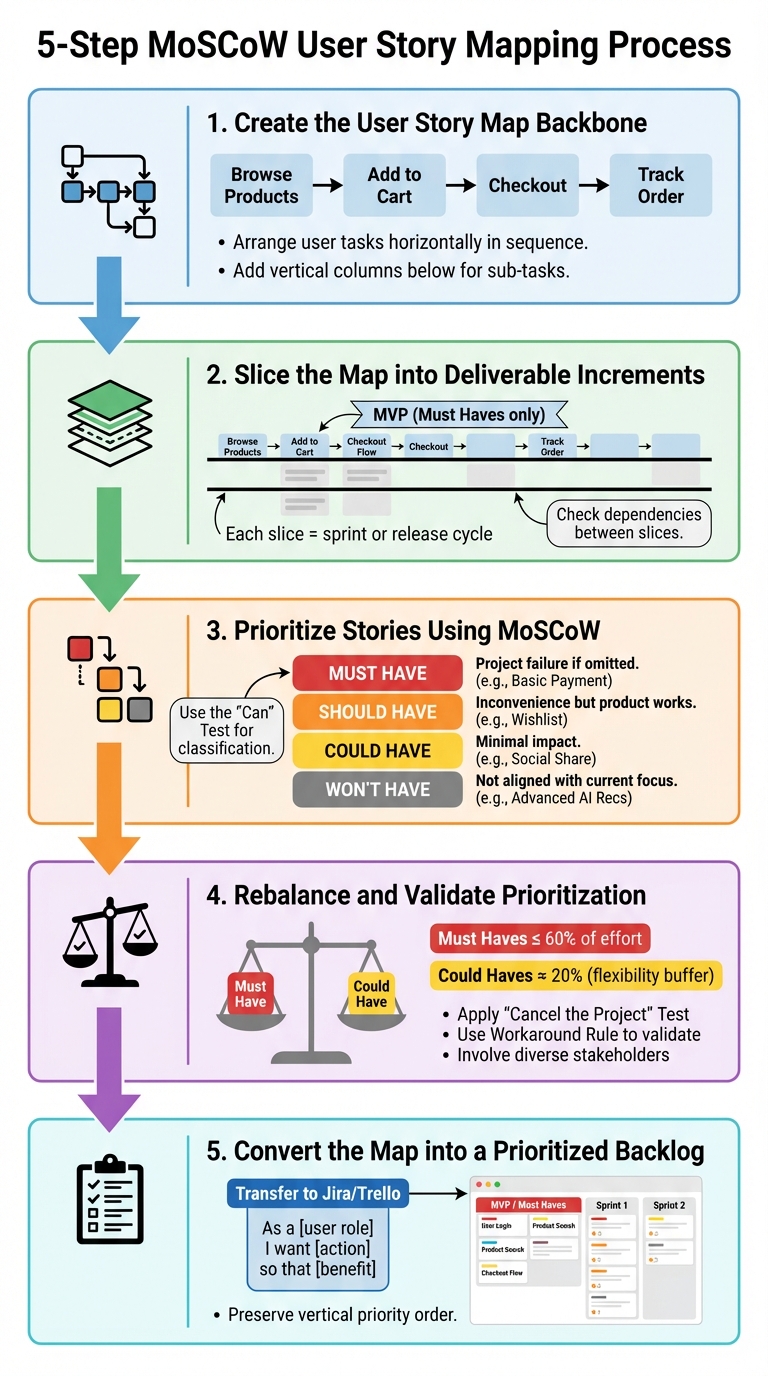
5-Step MoSCoW User Story Mapping Process Guide
Once your team is ready and the data is in place, it’s time to create the user story map and incorporate MoSCoW prioritization. This step organizes scattered requirements into a structured, value-driven plan.
Create the User Story Map Backbone
The backbone forms the top row of your story map and serves as a guide for the user journey. Think of it as directional signs along a highway. Mike Cohn, Founder of Mountain Goat Software, describes it like this:
"Think of the top row of the backbone as analogous to signs along a highway... top-row cards denote transitions between function areas" [9].
Start by outlining the sequence of user tasks needed to achieve a specific goal. Arrange these tasks horizontally to reflect the user journey. For instance, an e-commerce backbone might look like this: "Browse Products" → "Add to Cart" → "Checkout" → "Track Order."
Keep the labels concise - three or four words work best. This makes the map easy to read and quick to create [9]. Using physical tools like index cards or sticky notes can help with brainstorming and rearranging tasks quickly [3].
Below each backbone activity, add vertical columns to represent alternative ways to perform that task or break it into detailed sub-tasks. The vertical structure reflects options; you can think of it as "or" choices when reading down a column [9]. For more complex products, individual cards in these columns can expand into detailed submaps [9].
Walk through the backbone from the user’s perspective to spot any missing elements, such as error handling or additional features [9]. If the map becomes too wide, group related activities into epics or themes using blue heading cards above the backbone [9].
With the backbone in place, the next step is to divide the map into manageable, incremental deliverables.
Slice the Map into Deliverable Increments
After defining the backbone, split the story map horizontally into increments based on feasibility, dependencies, and value. Each slice represents a deliverable increment, such as a minimum viable product (MVP), release, or sprint. The first slice should only include Must Have stories that make up the MVP.
Draw horizontal lines across the map to separate these slices. Each slice should align with a realistic timeframe, like a sprint or release cycle.
Make sure that "Must Have" stories don’t rely on "Should Have" or "Could Have" stories, as lower-priority items might not make it into the final delivery [1]. If you find dependencies, either upgrade the dependent story to "Must Have" or move the dependent item to a later slice.
Prioritize Stories Using MoSCoW
Now it’s time to assign MoSCoW labels to each story in your map. Arrange stories vertically under their corresponding backbone activities, with the highest priority at the top and lower priorities below [9].
To quickly classify stories, use the "Can" Test: Replace the word "can" in a user story like "The user can login" with "MUST", "SHOULD", or "COULD" to see which best fits the business need [7]. Here’s how the categories break down:
| Category | Definition | Impact if Omitted |
|---|---|---|
| Must Have | Critical, non-negotiable, or legally required. | Project failure or cancellation. |
| Should Have | Important but not essential; has a workaround. | Users face inconvenience but the product works. |
| Could Have | Nice-to-have features that are low-cost improvements. | Minimal impact; dropped first if time is tight. |
| Won't Have | Not feasible or aligned with the current focus. | No impact for this release; keeps priorities clear. |
During prioritization workshops, use tools like simple votes or flashcards to quickly reach consensus [6]. As Lucidchart notes:
"MoSCoW prioritization omits the majority of bias and allows team members and stakeholders with disparate desires to come together as a united front" [10].
Even "Won’t Have" items should remain visible on the list to document that they were considered and intentionally set aside for now [7].
Rebalance and Validate Prioritization
After assigning MoSCoW labels, take a step back and reassess. This ensures the scope is realistic and focused. Apply the "Cancel the Project" Test: Ask, "If we can’t deliver this on time, will the entire project be canceled?" If the answer is no, it’s not a "Must Have" [1].
Ensure "Must Haves" don’t take up more than 60% of the total development effort. Allocate about 20% of the effort to "Could Haves" to leave room for flexibility [1]. If there are too many "Must Haves", break them into smaller, more critical elements [1].
Use the Workaround Rule: If a temporary or manual workaround exists, the requirement can’t be a "Must Have" [1]. For instance, if users can email orders instead of using an automated checkout, the automated checkout is a "Should Have."
Involve diverse stakeholders during validation. Support staff can offer user insights, while engineers can highlight technical constraints and effort estimates [4]. Document the reasoning behind each priority to make future reviews easier [4].
Once priorities are validated, you’re ready to convert the map into an actionable backlog.
Convert the Map into a Prioritized Backlog
Turn your MoSCoW-labeled map into an Agile backlog. The Product Owner can transfer items into tools like Jira or Trello, formatting them as "As a... I want... so that..." user stories [9].
Start with the MVP, focusing on "Must Have" stories, and schedule the rest for later sprints or releases. Keep the vertical order intact within each slice to preserve the established priority.
sbb-itb-8feac72
Facilitating and Maintaining Alignment
Once you've set up your MoSCoW-prioritized user story map, the real challenge is keeping everyone on the same page. Consistent facilitation and open communication with stakeholders are essential to ensure alignment. It's worth noting that only 35% of projects succeed when teams are overwhelmed by competing priorities. This makes facilitation a critical tool for keeping MoSCoW sessions focused [12].
Facilitation Techniques for Workshops
To keep workshops productive, consider these techniques:
- Timebox discussions: Limit the time spent on each topic to ensure the team focuses on high-level prioritization instead of getting bogged down in technical details [11].
- Use visual flashcard voting (M, S, C, W): This quick voting method helps gauge sentiment and prioritize effectively [6].
- Apply the Killer Question: Ask if failing to deliver a Must-Have item would prevent deployment. If not, it doesn't belong in the Must-Have category [1].
- Start with Won't-Have items: Place all requirements in the Won't-Have category initially, then require stakeholders to justify moving them up in priority. This approach encourages critical thinking and helps break down large stories into smaller, actionable sub-requirements [1].
Before the workshop kicks off, it's also helpful to establish an escalation path. Define a clear decision-making hierarchy (e.g., Business Ambassador → Business Visionary → Business Sponsor) to resolve deadlocks quickly and keep discussions moving [1].
Stakeholder Communication and Negotiation
Facilitation is only part of the equation - clear communication with stakeholders is just as crucial for refining priorities.
The MoSCoW framework provides a shared language for discussing trade-offs. For example, when a new Must-Have is proposed, use the Swap-Out Rule: if something new is added, something else of equal effort must be removed to maintain a realistic scope [13].
Stick to the 60% effort limit for Must-Haves, leaving about 20% for Could-Haves as a contingency buffer [1]. If more than half of your backlog is labeled as Must-Have, it’s a sign that priorities need re-evaluation [13].
Keep Won't-Have items visible in a prominent section of your backlog. This transparency shows that these ideas were considered and intentionally set aside, preventing them from being reintroduced later. As John O'Connor, Entrepreneur and Engineer, explains:
"By keeping the item on the list with a Won't designation, the team documents that the feature was considered and that it was purposely rejected" [7].
Additionally, document the reasoning behind key prioritization decisions. Use inline comments or meeting notes to record why certain choices were made. This creates a reference point for future discussions and supports objective re-evaluation if circumstances change [13] [4]. Including diverse perspectives - such as developers for technical feasibility, sales for user value, and project managers for resource constraints - strengthens alignment across the team [4].
Refining Based on Feedback
As your project progresses, priorities will naturally shift. Regularly review and adjust priorities to keep your backlog aligned with current needs. A feature that starts as a Could-Have might evolve into a Must-Have - or become irrelevant and move to Won't-Have - depending on changing user needs or technical constraints [1] [2].
When stakeholders request changes, hold structured review sessions. Invite them to provide feedback on specific placements rather than allowing them to rearrange items directly during the meeting. This keeps the discussion strategic and avoids endless debates [13].
For features with temporary solutions, apply the Workaround Rule to reclassify them appropriately [1].
Finally, maintain the 60% Must-Have cap even when incorporating feedback. If a new Must-Have would push you over this threshold, require stakeholders to identify an existing Must-Have to demote. This ensures honest discussions about what is truly essential and helps prevent scope creep from derailing your timeline [1] [13].
Common Pitfalls and Best Practices
Once you've established prioritization processes, it's crucial to identify potential missteps and follow best practices to maintain clear objectives. Even with solid frameworks like MoSCoW and user story mapping, it's easy for teams to veer off course. Spotting common mistakes - and knowing how to address them - can keep your project on track.
Avoiding Overprioritization
Resist the temptation to label every user story as a Must-Have. If too many features are deemed critical, your project loses the flexibility needed to meet deadlines. The Agile Business Consortium suggests that Must-Have requirements should account for no more than 60% of the total project effort to ensure delivery confidence [1]. If this threshold is exceeded, it's a sign that your stories might need further refinement. Large features marked as Must-Have should be broken down into smaller sub-stories. Often, only part of a feature is essential, while the rest can be categorized as Should-Have or Could-Have.
To determine if a feature is truly critical, apply a decisive test and check for dependency conflicts. For example, a Must-Have feature reliant on a lower-priority item introduces risks if that dependency isn't delivered. Keeping these conflicts in check helps maintain logical consistency in your prioritization process.
Additionally, managing scope effectively is key to avoiding overprioritization pitfalls.
Maintaining Realistic Scope
Without clear effort limits, scope creep can easily derail your project. Stick to the 60/20/20 effort rule: allocate no more than 60% of your resources to Must-Haves, with 20% for Should-Haves and 20% for Could-Haves [1]. This allocation ensures a contingency buffer from the Could-Have category, which becomes critical when timelines are tight.
The Workaround Test is another useful strategy. If a requirement has a manual or inconvenient workaround, it may not truly belong in the Must-Have category. Instead, consider downgrading it to Should-Have or Could-Have [1].
Ensuring User-Centric Prioritization
Effective prioritization goes beyond technical requirements - it must reflect what users actually need. A common risk is allowing dominant opinions to overshadow genuine user value [14]. To counter this, establish clear, objective criteria before starting your prioritization sessions. For instance, set thresholds based on the number of users impacted or measurable ROI targets [1].
Involving a diverse group in these sessions is equally important. Sales teams can share customer pain points, support teams can highlight recurring issues, and developers can provide insights into technical feasibility. This collaborative approach ensures a more balanced prioritization process.
To enhance your prioritization efforts, consider using tools like a 2x2 matrix. This matrix evaluates user stories by comparing the effort required against the value delivered to users [6]. Keep in mind that priorities are not set in stone. Revisit and adjust them at the end of each timebox or increment as user needs and project conditions evolve [2].
Conclusion
Blending MoSCoW prioritization with user story mapping offers a straightforward way to cut through unnecessary complexity and focus on delivering what matters most. By defining your Minimum Usable Subset (MUST), you ensure that even under tight resource constraints, a functional product gets delivered. This approach ties strategic priorities directly to the user journey, creating a clear roadmap from vision to execution. The Agile Business Consortium's 60/20/20 effort rule adds a built-in safety net, helping projects stay on track without sacrificing quality [1].
MoSCoW also introduces business-focused, objective categories that replace subjective priority debates, giving technical leaders a better way to manage constraints and align stakeholders. The Won't Have category acts as a safeguard against scope creep, while the Could-Have group provides a flexible buffer, maintaining productivity without jeopardizing essential deliverables.
As priorities shift, revisit MoSCoW categories after each sprint to stay aligned with changing needs. A task labeled as Could-Have today might become a Must-Have tomorrow, and this adaptability is what makes this combined method so effective for creating value-focused products in fast-moving environments. Applying these principles can elevate your product strategy to the next level.
For those aiming to sharpen their prioritization skills and better connect technical execution with strategic goals, Tech Leaders offers engineering leadership training. Their programs are designed to help you master frameworks like these while building the business expertise needed to drive product success.
FAQs
How can I use MoSCoW prioritization with user story mapping in product development?
MoSCoW prioritization and user story mapping are a powerful duo for creating a clear and actionable roadmap for product development. The process starts with building a user story map - a visual representation of user activities that breaks them down into detailed, manageable stories. Once the map is complete, you can apply the MoSCoW framework to prioritize each story. The framework uses four categories: Must-have, Should-have, Could-have, and Won’t-have.
By tagging each story with its MoSCoW label, you can easily highlight priorities across the entire user journey. During the planning phase, the focus should always begin with Must-have stories, ensuring that essential features are delivered first. Once those are complete, move on to Should-haves and Could-haves. This structured approach helps your team stay on track, delivering the most value while balancing trade-offs effectively.
It’s also important to revisit and adjust priorities regularly as new information becomes available. This keeps your roadmap adaptable and ensures it stays aligned with user needs and business goals.
For those looking to master this method, Tech Leaders offers detailed training on combining MoSCoW prioritization with user story mapping. These insights can help engineering leaders confidently guide their teams toward product success.
How can I prepare for a MoSCoW-based user story mapping session?
To get ready for a MoSCoW-driven user story mapping session, start by collecting all your user stories in one place. This ensures nothing slips through the cracks. Make sure your team understands the MoSCoW categories: Must Have (critical needs), Should Have (important but not urgent), Could Have (nice additions), and Won’t Have (excluded items). Define clear criteria for each category - like business value, risk, or deadlines - to keep the discussion focused and productive.
Next, set up a visual board or template - this could be physical or digital - organized by the MoSCoW categories and the user story backbone. Gather key participants, such as product owners, developers, and stakeholders, to bring a variety of viewpoints to the table. Before the session, give everyone a quick overview of the MoSCoW method, your criteria, and how the board is structured. During the workshop, work together to review and prioritize each story, building a roadmap that’s clear and actionable for your team.
How can I prioritize user stories to stay focused on both user needs and business goals?
To keep your prioritization both user-centered and aligned with business goals, start by collecting user research and defining key business objectives. Connect user needs with the business metrics they affect to establish a solid foundation. Next, map user stories to the customer journey to see how they shape the overall experience.
Score each story based on two factors: user value (like how often the issue arises or the level of frustration it causes) and business impact (such as revenue opportunities or risk reduction). These scores can guide you in assigning MoSCoW categories: Must-have for items with high value and impact, Should-have for those with high value but moderate impact, and so on. Work closely with stakeholders to confirm these priorities and clearly document the reasoning behind each choice for transparency.
Make it a habit to revisit and tweak priorities as new feedback or business goals emerge. This ongoing process ensures your prioritization stays relevant and effective in a changing environment.